
If you want one pick: in 2026 our recommendation for most travelers is the GL.iNet Beryl 7. It supports WiFi 7, runs WireGuard VPN connections at up to 1,100 Mbps, takes USB-C power from any phone charger or power bank, and is small enough to disappear into a packing cube.
As travel writers and photographers who have been managing our work on the road since 2010, staying connected is a big part of what we do. Laurence has a background in computer science and software engineering, so he tends to be the one evaluating and testing the tech side of things. We have used travel routers from multiple brands over the years, and in this guide we share what we have learned and which ones we currently recommend.
The article covers our full set of picks across price ranges and use cases, explains what a travel router actually does (and what it does not do), and answers the question we get most often from readers, which is whether you even need one in 2026 now that eSIMs have changed the game.
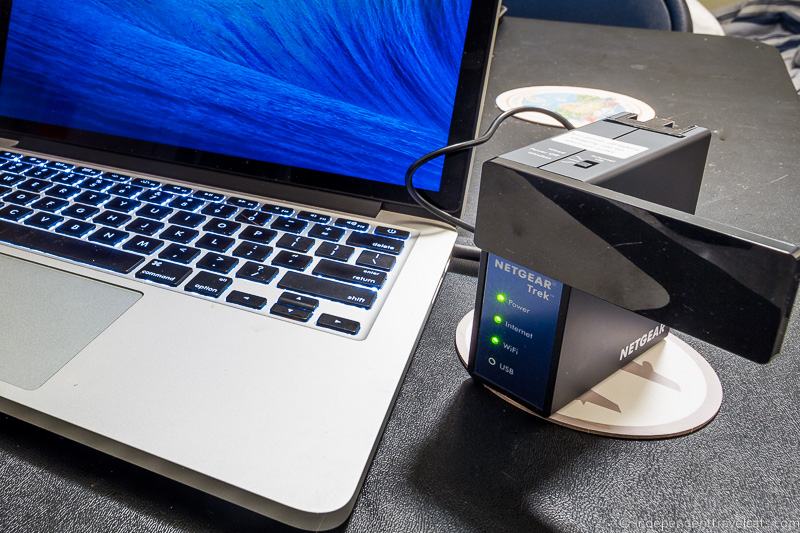
Table of Contents:
Travel Router Comparison at a Glance
The table below sets our top picks side by side so you can see the headline differences in WiFi standard, current price, and weight before you read the longer write-ups. Prices are pulled live from Amazon, so they reflect what you would pay today.
| Pick | Best for | WiFi standard | Price | Weight |
|---|---|---|---|---|
| GL.iNet Beryl 7 | Most travelers (our top pick) | Wi-Fi 7 (BE3600 dual-band) | Check price on Amazon | 205g (7.23 oz) |
| GL.iNet Beryl AX (cheaper alternative) | Wi-Fi 6 value alternative to the Beryl 7 | Wi-Fi 6 (AX3000) | Check price on Amazon | 196g (6.91 oz) |
| TP-Link Roam 7 | Mid-range Wi-Fi 7 if you prefer TP-Link’s firmware | Wi-Fi 7 (BE3600 dual-band) | Check price on Amazon | ~135g (4.76 oz) |
| ASUS RT-BE58 Go | ASUS AiMesh households who want Wi-Fi 7 | Wi-Fi 7 (BE3600) | Check price on Amazon | 232g (8.18 oz) |
| GL.iNet Mango | Smallest, cheapest backup router | Wi-Fi 4 (2.4GHz only) | Check price on Amazon | 40g (1.41 oz) |
| GL.iNet Slate 7 | Premium GL.iNet pick with touchscreen | Wi-Fi 7 (BE3600) | Check price on Amazon | 295g (10.4 oz) |
| GL.iNet Slate 7 Pro (forthcoming) | Tri-band Wi-Fi 7 with a 6GHz lane (US sales pending FCC clearance) | Wi-Fi 7 (tri-band, 6GHz) | $239.99 MSRP, not yet sold in the US | not published |
Prices update live from Amazon at least once a day. Where a price does not display, follow the product link for the current figure. The Slate 7 Pro is not yet available to buy in the US, as covered below.
Do You Actually Need a Travel Router in 2026?
For most casual travelers in 2026, an eSIM plus your phone’s hotspot is enough. A travel router earns its place when one of the specific situations below applies, but it is no longer essential kit for everyone.
When we started using travel routers back in 2014, getting online abroad often meant hunting for hotel WiFi or buying local SIM cards at airport kiosks. A travel router was a near-essential tool for anyone traveling with more than one device.
Today, eSIMs have changed the picture considerably. If your phone supports eSIM (and most phones sold in the last few years do), you can buy a data plan before you leave home and activate it the moment you land. Services like Airalo make this easy. For many casual travelers carrying a phone and maybe a tablet, an eSIM on your phone with its built-in personal hotspot may be all you need.
We will be straight with you: we rarely travel with a dedicated travel router these days, because an eSIM handles most of our basic connectivity needs on shorter trips.
A travel router still earns its place in your bag in several specific situations:
- Hotels that restrict logins to one device. The travel router appears as a single device on the network, so you can connect all your devices to it without paying for multiple logins or entering credentials on each one separately.
- You need to connect a streaming device. If you travel with a Chromecast, Fire Stick, or Apple TV, you will likely need a travel router. These devices cannot handle hotel captive portal login pages on their own, so a travel router bridges that gap.
- You want VPN protection across all your devices at once. Rather than running VPN software on every phone, laptop, and tablet individually, you can configure a VPN on the travel router and everything connected through it is protected automatically.
- You are a remote worker with corporate security requirements. Some employers require a wired Ethernet connection or specific VPN configurations. Many travel routers have Ethernet ports and support enterprise VPN setups.
- You are traveling with a group. A family of four with eight devices between them will appreciate a single login point that shares the connection to everyone.
- Hotel or public WiFi is weak or unreliable. A travel router with a good antenna can pick up a weak signal from a hotel lobby and amplify it enough to use in your room.
If none of those situations apply to you and you are just traveling with a phone that supports eSIM, you can probably skip the travel router and use your phone’s hotspot when you need to connect a laptop. See our full review of Airalo eSIMs for more on that option.
For everyone else, read on for our recommendations.
What to Look For in a Travel Router
Six features separate a useful travel router from a frustrating one: the WiFi standard, VPN support, captive portal handling, USB-C power, size and weight, and the number and speed of Ethernet ports.
WiFi Standard. Travel routers currently come in WiFi 4, WiFi 5, WiFi 6, and WiFi 7 versions. For most people, WiFi 6 still hits the sweet spot between price and performance in 2026. WiFi 7 models like the Beryl 7 and Roam 7 are now mainstream, but public WiFi networks are not fast enough yet to take advantage of WiFi 7 speeds in most real-world travel situations. WiFi 4 (like the Mango we list below) still works fine for basic tasks but is showing its age.
VPN Support. If you use a VPN service like NordVPN, Surfshark, or similar, look for a router that supports entering VPN credentials directly. This means every device connected to the router runs through the VPN automatically. Most GL.iNet routers and the ASUS models on our list support this. The GL.iNet routers also support both OpenVPN and WireGuard, with WireGuard being significantly faster.
Captive Portal Handling. This is a fancy term for those hotel WiFi login pages where you have to enter your room number or accept terms before getting online. Every router on our list handles these, but it is one of the most common frustrations readers have reported to us over the years. If you have had trouble with captive portals in the past, the GL.iNet routers have been the most reliable in our experience.
USB-C Power. All the newer travel routers on our list run on USB-C, which means you can power them from a standard USB power bank or your laptop. This is a big improvement over older models that needed proprietary chargers. When choosing a power bank, check that it outputs at least 5V/3A, as some routers need that to operate reliably.
Size and Weight. Travel routers range from 40g (the tiny Mango) to around 295g (the feature-packed Slate 7). If size and weight matter to you, pay attention to these specs in our reviews below.
Ethernet Ports. Most travel routers include at least one Ethernet port, which lets you plug into a wired connection and create a wireless network from it. Some have multiple ports, which is useful if you need to connect a laptop via cable while also sharing WiFi to other devices. Port speeds also vary: the Beryl 7 has two 2.5G ports, the Roam 7 pairs one 2.5G WAN port with a 1G LAN port, and the Mango is limited to 100Mbps ports.

The Best Travel Routers in 2026
Our picks are listed from the router we would recommend to most people first, down to more specialized options. The best choice comes down to your budget, how many features you need, and whether you want something tiny and cheap or fast and future-proof.
1. GL.iNet Beryl 7 (GL-MT3600BE): Best for Most Travelers
If we had to recommend just one travel router in 2026, this is the one. GL.iNet announced the Beryl 7 at CES 2026 and the router started shipping in February 2026 at an MSRP of $139.99. It is the direct successor to the Beryl AX (which had been our top pick since 2024), and the upgrade is meaningful.
The Beryl 7 supports WiFi 7 on a BE3600 dual-band configuration: 688 Mbps on the 2.4GHz band and 2,882 Mbps on the 5GHz band. Note that this is a dual-band WiFi 7 router, not a tri-band model with 6GHz support, so if you are specifically after the 6GHz band you will need the larger Slate 7 Pro (covered further down).

You get two 2.5 gigabit Ethernet ports (one configurable WAN, one LAN), a single USB 3.0 port for tethering or storage, and USB-C Power Delivery so any phone charger or laptop charger that hits 12V/2.5A will run it. There is no battery and no SIM slot. If you need cellular connectivity, you will pair this with your phone’s hotspot or an eSIM.
VPN performance is where this router really shines. WireGuard speeds run up to 1,100 Mbps and OpenVPN-DCO up to 1,000 Mbps. To put that in context, most travel routers we have used over the years struggled to maintain 100 Mbps through a VPN, so the Beryl 7 is in a different class for anyone who runs every device through a VPN by default. The router runs on OpenWRT (a Linux-based open-source operating system, the same one GL.iNet has used across its product line since the Mango days), gets regular firmware updates, and the web interface is simple enough that you do not need to be technical to set it up.
At 205g (7.23 oz) and 120 x 83 x 34mm, the Beryl 7 is about the same physical size as the Beryl AX it replaces. We have tested the Beryl AX extensively and recommended it to dozens of readers since 2024, and the Beryl 7 carries forward the same form factor, the same firmware lineage, and the same reliability profile that made the Beryl AX our default pick. Independent reviews from NAS Compares (February 2026) have backed up the manufacturer’s WireGuard performance claims.
Price: Check the latest price on Amazon or buy direct from GL.iNet.
Cheaper alternative. If the price is more than you want to spend on a travel router, the GL.iNet Beryl AX (GL-MT3000) is still in active production and is usually available for a lower price. It is the WiFi 6 cousin to the Beryl 7. You get the same form factor (120 x 83 x 34mm, 196g / 6.91 oz), USB-C power, USB 3.0, and OpenWRT firmware. The trade-offs are WiFi 6 instead of WiFi 7 (574 Mbps 2.4GHz / 2,402 Mbps 5GHz), one 2.5G WAN port plus one 1G LAN port (the Beryl 7 has two 2.5G ports), and a much slower WireGuard ceiling at 300 Mbps. For travelers who do not need WiFi 7 client devices or high-throughput VPN performance, the Beryl AX is still a great router and noticeably cheaper. Check latest price on Amazon here and direct from GL.iNet here.
2. TP-Link Roam 7 (TL-WR3602BE): Best Mid-Range WiFi 7 Value
The Roam 7 is TP-Link’s first WiFi 7 travel router, launched in August 2025, and it has quickly become one of the most-reviewed travel routers of the past year. Tom’s Hardware, TechRadar, Dong Knows Tech, and NAS Compares have all published full reviews, which makes it the easiest WiFi 7 travel router to research before buying.

Specifications match the Beryl 7 closely: WiFi 7 BE3600 dual-band, 688 Mbps on 2.4GHz and 2,882 Mbps on 5GHz, USB 3.0 port for tethering and storage, USB-C powered, and VPN support across OpenVPN, WireGuard, PPTP, and L2TP. Where it differs from the Beryl 7 is the Ethernet port configuration: one 2.5G WAN port paired with one 1G LAN port (the Beryl 7 has two 2.5G ports), and a wider set of seven operating modes including a 3G/4G USB modem mode (no 5G cellular modem support). MSRP is $139.99, the same as the Beryl 7.
In practice, what makes the Roam 7 worth considering instead of the Beryl 7 comes down to firmware preference. The Roam 7 runs TP-Link’s standard router OS rather than OpenWRT, which means a more polished out-of-the-box interface but less flexibility for power users. If you already use TP-Link routers at home and prefer the familiarity, the Roam 7 is a strong pick. If you specifically want OpenWRT for its open-source ecosystem and configurability, stick with the Beryl 7. TP-Link does not publish a weight figure on its product page, but third-party reviews put it at around 135g (4.76 oz), so it is lighter than the Beryl 7.
Price: Check the latest price on Amazon.
Cheaper alternative. If you want a TP-Link travel router but the price is steeper than you need to go, the TP-Link TL-WR1502X is the WiFi 6 budget option in the lineup. It supports WiFi 6 with 300 Mbps on the 2.4GHz band and 1,201 Mbps on the 5GHz band, gigabit Ethernet ports, USB 2.0 for tethering, and USB-C Power Delivery. VPN support is included across OpenVPN, WireGuard, PPTP, and L2TP. TP-Link also sells the slightly newer TL-WR3002X, a 2025 refresh with a 2.5G WAN port and 160MHz channel width support. If you find that one at a similar price, go with it instead. Check latest price on Amazon here.
3. ASUS RT-AX57 Go: Best for ASUS Home Network Users
The RT-AX57 Go is a WiFi 6 travel router from ASUS that launched in early 2024. It offers speeds on par with the Beryl AX (574 Mbps on 2.4GHz, 2,402 Mbps on 5GHz) and comes loaded with features.

You get USB-C power, a USB 3 port for tethering and file sharing, two gigabit Ethernet ports, and VPN credential support including one-click setup for NordVPN and Surfshark.
The standout feature of ASUS travel routers is AiMesh. If you already have an ASUS router at home, this little travel router integrates without dropping connection into your existing mesh network. When you are not traveling, you can use it as an additional mesh node to extend your home WiFi coverage. That dual-purpose functionality makes it a particularly smart buy for ASUS households.
It comes with ASUS’s AiProtection security suite (powered by Trend Micro), which adds malware blocking and network security scanning. At 210g (7.41 oz) it is not the lightest option, but the build quality and software are both solid.
Price: Check the latest price on Amazon.
4. ASUS RT-BE58 Go: Best WiFi 7 Travel Router for AiMesh Users
Released in late 2025, the RT-BE58 Go is the WiFi 7 upgrade to the RT-AX57 Go above and has quickly become one of the most talked-about travel routers on the market.
We have not personally tested this model, but based on its specifications, the reviews from multiple trusted tech publications, and our experience with the ASUS travel router line, we feel confident including it here. It has received strong reviews from both Dong Knows Tech and Tom’s Hardware, two of the most thorough router review sites.

With WiFi 7 support, you get theoretical speeds up to 3,570 Mbps combined across both bands (marketed as BE3600), a 2.5 gigabit WAN port, a gigabit LAN port, USB 3.0 for tethering, and the same full ASUS firmware as its larger home router siblings. It has a foldable antenna design for portability and a one-touch function switch for quickly changing between operating modes.
USB-C Power Delivery means you can run it from a standard USB-C power bank or your laptop’s charger. At 232g (8.18 oz), it is slightly heavier than the AX57 Go, but still portable.
Like the AX57 Go, it supports AiMesh, so it doubles as a mesh network extender at home. If you already have an ASUS router at home and want the latest WiFi technology in a travel router, this is the one to get.
Price: Check the latest price on Amazon.
5. GL.iNet GL-MT300N-V2 (Mango): Best Budget Option
The Mango has been around for a while and it shows its age in certain ways, but at its budget price it remains one of the most popular travel routers on the market for good reason. At 40g (1.41 oz) and roughly the size of a matchbox, you can literally slip it into your pocket and forget it is there.
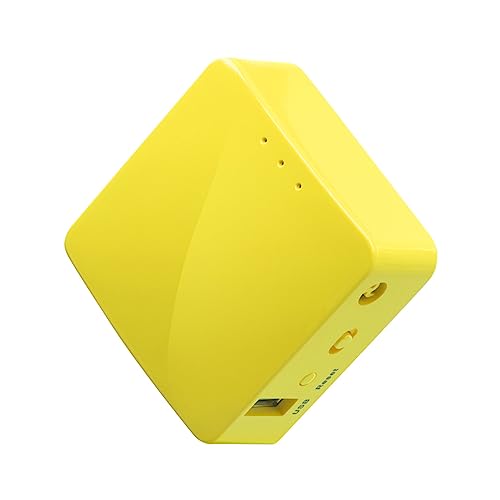
It only supports 2.4GHz WiFi at 300 Mbps (WiFi 4), so it is not fast by modern standards. But for the tasks most travelers need, which are connecting multiple devices to a hotel network through a single login, adding a layer of security on public WiFi, or sharing a tethered phone connection, it gets the job done.
Like all GL.iNet routers, it runs OpenWRT, supports VPN credentials (both OpenVPN and WireGuard), and gets regular firmware updates. It has two 100 Mbps Ethernet ports and is powered by micro-USB, so any phone charger or power bank will run it.
The limitations are real though. The 2.4GHz-only operation means it can be slower in congested WiFi environments (airports, conference centers), and the 100 Mbps Ethernet ports are a bottleneck if you ever need to connect to a fast wired network. At this budget price though, those are reasonable trade-offs for a backup device or for travelers on a tight budget.
A successor is on the way. GL.iNet has announced the Mango 2 (GL-MG1300), a dual-band update to this single-band original. It is still pre-launch at the time of writing, with no confirmed price or release date, and its US availability is not yet certain: like GL.iNet’s other newest routers (the Slate 7 Pro and Flint 4), it may be affected by current US FCC certification requirements. We have a review unit on the way and will update this section once we have tested it. If you want the cheapest pocket router you can buy today, the original Mango still does the job. If you can wait, the Mango 2 is worth keeping an eye on.
Price: Check the latest price on Amazon or buy direct from GL.iNet.
6. GL.iNet GL-A1300 (Slate Plus): Solid Mid-Range GL.iNet Option
The Slate Plus sits between the budget Mango and the higher-end Beryl AX in GL.iNet’s lineup. It supports dual-band WiFi 5 with speeds of 400 Mbps on 2.4GHz and 867 Mbps on 5GHz, three gigabit Ethernet ports, and a USB 3.0 port with media server capabilities.
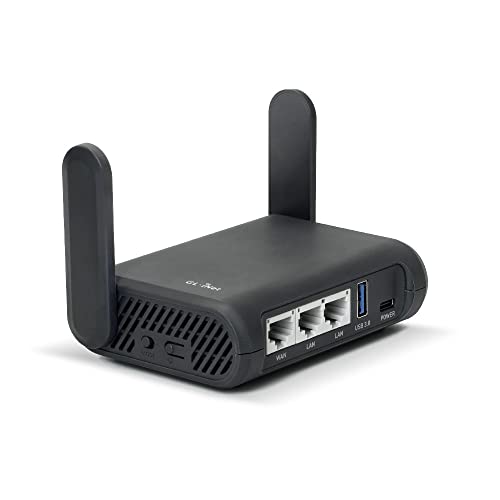
This was the router we most frequently recommended to readers who asked us for advice in 2024, particularly as a step up from the discontinued Beryl (GL-MT1300) that we used to travel with. It shares the same OpenWRT foundation and VPN support as the other GL.iNet models, and at 181g (6.38 oz) it is a similar size to the Beryl AX.
The main reason to consider this over the Beryl AX is price. If you find it on sale, it can be a good value. Otherwise, the Beryl AX is the better buy with its faster WiFi 6 support and newer processor.
Price: Check the latest price on Amazon or buy direct from GL.iNet.
7. GL.iNet Slate 7 (GL-BE3600): Premium WiFi 7 GL.iNet Pick
If you want one of the fastest and most feature-loaded travel routers available and prefer GL.iNet’s OpenWRT ecosystem, the Slate 7 is the top of the line in the dual-band WiFi 7 tier. It supports WiFi 7 with speeds up to 688 Mbps on 2.4GHz and 2,882 Mbps on 5GHz.

Those speeds are far faster than any public WiFi network you are likely to encounter, and WiFi 7 client devices are still relatively uncommon in 2026. But the Slate 7 will be relevant for years as WiFi 7 adoption increases, and it is backward compatible with older WiFi standards.
You get dual 2.5 gigabit Ethernet ports, USB-C power, and a small built-in touchscreen for controlling basic settings without needing a phone or laptop. A quad-core CPU and 1 GB of RAM let it handle up to 120 simultaneous device connections, which is far more than most travelers will ever need.
The main trade-off is weight. At 295g (10.4 oz), it is the heaviest option on our list. For travelers who want the absolute best performance on the GL.iNet line and do not mind carrying a slightly larger device, this is it. For everyone else, the Beryl 7 or the ASUS RT-BE58 Go will handle travel needs at a lower price and weight.
Price: Check the latest price on Amazon or buy direct from GL.iNet.
Coming soon: GL.iNet Slate 7 Pro (GL-BE10000). GL.iNet previewed the Slate 7 Pro at CES 2026 and it is now shipping in the EU, UK, and Canada, where it launched at the end of May 2026. It is a tri-band WiFi 7 router with a dedicated 6GHz lane (5,765 Mbps on 6GHz, 4,323 Mbps on 5GHz, 688 Mbps on 2.4GHz, roughly 10.8 Gbps aggregate), dual 2.5G Ethernet ports, USB-C 3.0, WireGuard performance up to 1,100 Mbps, and a 2.8-inch color touchscreen. MSRP is $239.99. One important caveat for US readers: GL.iNet has confirmed the Slate 7 Pro will not be sold in the US during its initial release while it completes FCC certification, so the GL.iNet US product page shows it as unavailable. If 6GHz tri-band WiFi 7 matters to you and you are buying from outside the US, this is the next-generation step up from the Slate 7. We will revisit this section once the router ships to all markets and we can see how it performs in practice.
8. Netgear Nighthawk Range: For When You Need a Mobile Hotspot Too
Everything above is a travel router, meaning it extends or secures an existing WiFi or Ethernet connection. But what if you need to get online in a place with no WiFi at all?
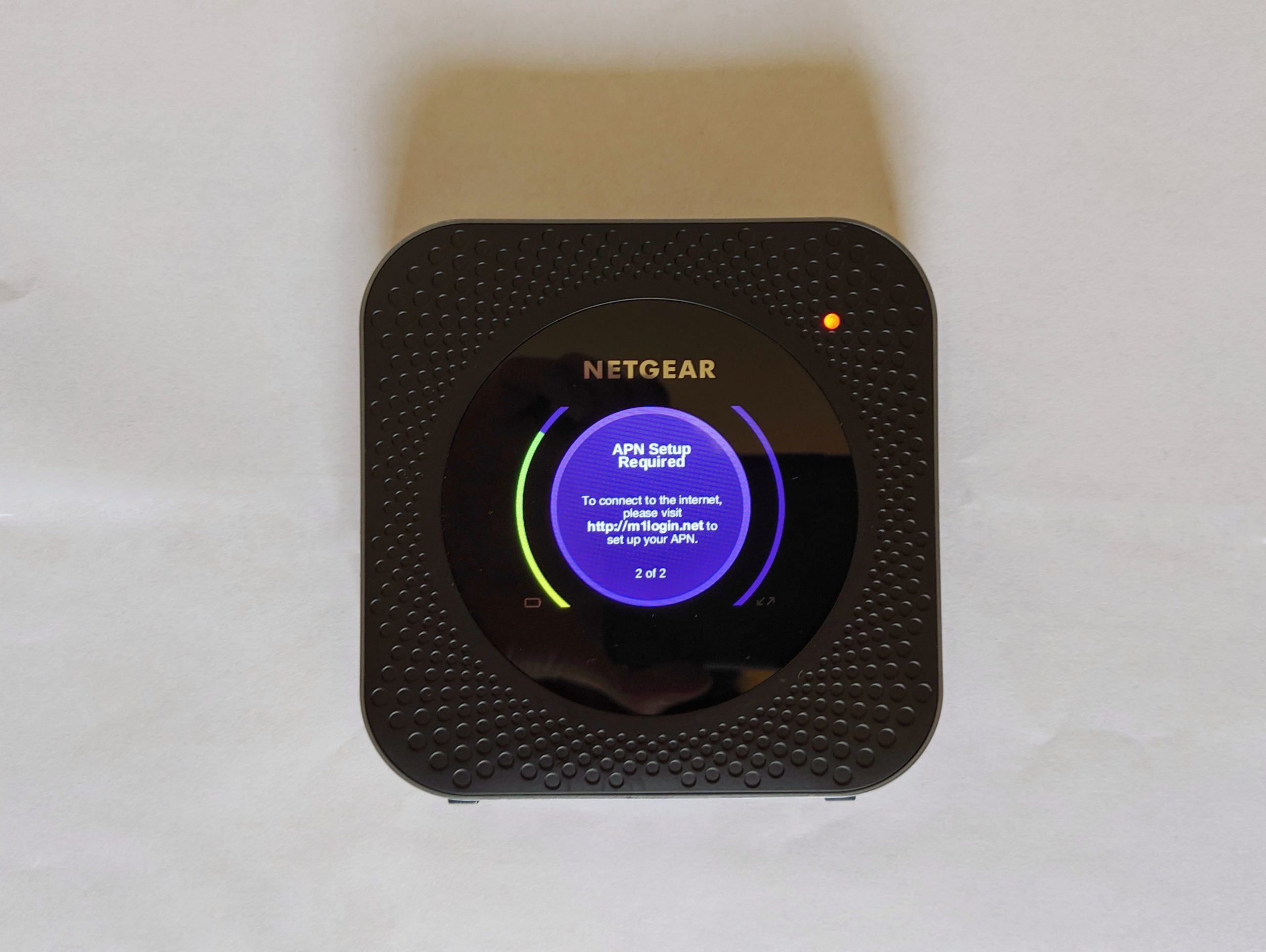
That is where a mobile hotspot comes in, and the Netgear Nighthawk range of devices combines hotspot and travel router functionality in one unit. These are a different category of product at a significantly higher price point, but they can be worth it for certain travelers.

The current Netgear flagship is the Nighthawk M7 (MH7150), which launched in January 2026. It supports WiFi 7, includes a built-in eSIM marketplace for buying data plans on the device itself, runs on the latest 5G modem, and is the first Nighthawk to ship with eSIM support out of the box. If you are buying a new mobile hotspot in 2026, this is the model to consider first.
Older but still on the market are the Nighthawk M5 and Nighthawk M6, which both support 5G and WiFi 6 with touchscreen interfaces. These remain solid options at lower prices than the M7. The original Nighthawk M1 (MR1100) is a 2017-era 4G LTE-only device and we no longer recommend it as a current buy. It is still available secondhand and at some retailers, but the 4G-only limitation is a hard stop for anyone wanting current cellular performance.
Before buying any Nighthawk, check that it supports the cellular bands used in the countries you plan to visit. Not all models work on all networks worldwide.
For many travelers who just need cellular data abroad, an eSIM on your phone combined with your phone’s personal hotspot feature may do the same job at a fraction of the cost. The Nighthawk makes sense primarily when you need to connect many devices at once over cellular data, or when you need the dedicated device for reliability over long periods.
Price: Check latest price here.
Basic Information on What a Travel Router Does
If you are new to travel routers, this section explains what they do and how they work. Laurence has put his years of experience as a software engineer to use to explain everything in plain terms.
What is a Travel Router?
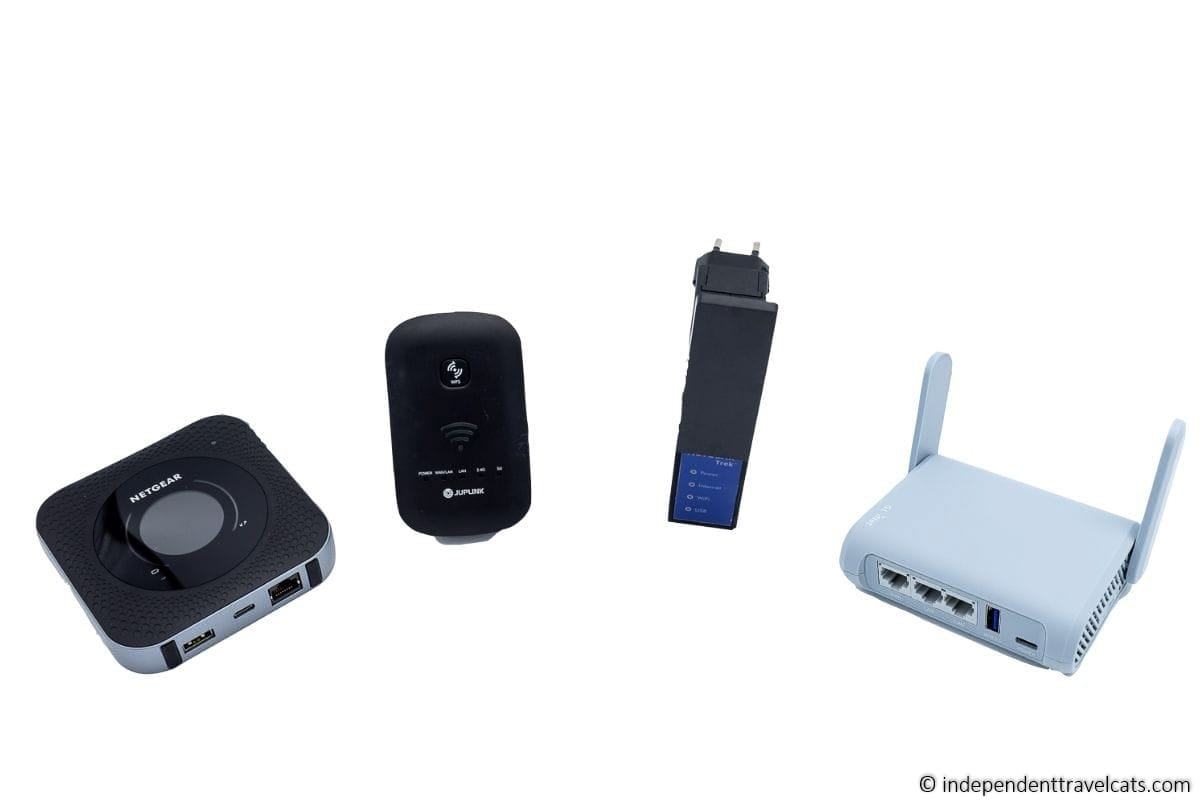
A travel router is a compact wireless device that takes an existing Internet connection and shares it with your devices. Think of it as a miniature version of the WiFi router you have at home, but designed to be portable and to work with the kinds of connections you encounter while traveling.
You can also use one at home to extend the range of your existing home WiFi network to reach areas with a weak signal.
What Does a Travel Router Do?
The specific features vary between models, but here is what most travel routers can do:
- Extend the range of wireless networks. If a hotel has WiFi but the signal does not reach your room well, the travel router’s antenna can pick up the weak signal and amplify it so your devices can connect more reliably.
- Create a private network on public WiFi. When you connect to unsecured public WiFi at a coffee shop or airport, a travel router adds a firewall between your devices and the public network. This makes it harder for anyone to intercept your data. You should still avoid entering sensitive information like banking passwords on public networks.
- Connect multiple devices with a single login. The travel router appears as one device on the hotel network. You log in once through the router, and then connect all your phones, laptops, tablets, and streaming devices to the router’s own network without needing separate logins for each.
- Turn a wired connection into a wireless one. If your hotel room only has an Ethernet cable, you can plug it into the travel router and create a WiFi network for all your devices.
- Share your phone’s data connection. Most travel routers have a USB port that you can plug your smartphone into. The router then shares your phone’s cellular data over WiFi, which is more efficient than your phone’s built-in hotspot for connecting many devices.
How Much Do Travel Routers Cost?
Prices range from about $30 for a basic model like the GL.iNet Mango to around $140 for a premium WiFi 7 router like the GL.iNet Beryl 7 or TP-Link Roam 7. For most travelers, something in the $50 to $100 range will do everything you need.
Premium tri-band WiFi 7 models with 6GHz support, like the forthcoming GL.iNet Slate 7 Pro at an MSRP of $239.99, sit above this range and are worth the extra cost only if you specifically need 6GHz performance.
Mobile hotspot devices that also function as travel routers, like the current Netgear Nighthawk M7, sit around $500 at MSRP. Older Nighthawk models can be cheaper if you find them still in stock.
What We Like About Travel Routers
Our primary use for a travel router has been extending existing WiFi connections. We have often arrived at a hotel happy to learn that wireless Internet exists, only to find that the signal barely reaches our room. Pulling out a travel router to strengthen the signal has saved us more times than we can count.
The multi-device login feature has also been valuable for us as a couple. Between our phones, laptops, and cameras, we regularly have six or more WiFi-enabled devices that need to get online. On networks that restrict you to one device per login, a travel router pays for itself immediately.
We also appreciate that most modern travel routers are powered through USB-C (or micro-USB on older models), so you can run them from a laptop or USB power bank without needing access to a wall outlet.
If you plan to use public WiFi regularly while traveling, we recommend getting a travel router that supports a VPN service. You can see Laurence’s guide to VPNs for travel for tips on choosing a VPN provider.
Limitations of Travel Routers
A travel router is not a mobile hotspot (with the exception of the Netgear Nighthawk). It cannot create an Internet connection where one does not already exist. If there is no WiFi signal and no Ethernet cable, a regular travel router cannot get you online.
If you need Internet access in places with no WiFi, your options are a mobile hotspot device, an eSIM with your phone’s personal hotspot feature, or a local SIM card. See our guide to getting online when traveling for more on these options.
Even with a travel router’s antenna, sometimes the WiFi signal is simply too weak to work with. We have spent time in a few locations trying to make a connection work when the underlying signal was just not strong enough. A travel router can improve a weak signal, but it cannot perform miracles with a nonexistent one.
One more thing: a travel router cannot make a slow Internet connection faster. If the hotel’s Internet is 2 Mbps, the travel router will give you a more reliable 2 Mbps connection across your devices, but it will not turn it into 20 Mbps. It improves reliability and reach, not speed.
Frequently Asked Questions About Travel Routers
What is the best travel router in 2026?
For most travelers in 2026, our pick is the GL.iNet Beryl 7. It supports WiFi 7, runs WireGuard VPN connections at up to 1,100 Mbps, takes USB-C power from any phone charger or power bank, and fits easily in a pocket at 205g.
If you want a slightly cheaper alternative, the GL.iNet Beryl AX (the WiFi 6 cousin to the Beryl 7) is still in production at an MSRP of $98.99 and is a great router. If you prefer TP-Link’s firmware over OpenWRT, the TP-Link Roam 7 is the equivalent WiFi 7 mid-range pick.
Should I buy a WiFi 6 or WiFi 7 travel router?
WiFi 6 is still the right choice for most travelers in 2026. The public WiFi networks you encounter in hotels and cafes are rarely fast enough to take advantage of WiFi 7 speeds, and WiFi 6 routers are now cheaper than the WiFi 7 equivalents.
Buy a WiFi 7 travel router if you are also going to use it at home with WiFi 7 client devices, if you want the best possible VPN throughput (the Beryl 7 reaches 1,100 Mbps on WireGuard compared to 300 Mbps on the WiFi 6 Beryl AX), or if you want a router that will stay current for the next five to seven years without needing replacement.
GL.iNet Beryl 7 vs Beryl AX, which should I buy?
The Beryl 7 is the WiFi 7 successor to the Beryl AX. Both have the same form factor and run on OpenWRT, but the Beryl 7 adds WiFi 7 support, faster Ethernet (dual 2.5G ports vs 2.5G WAN plus 1G LAN on the Beryl AX), and much faster VPN throughput (1,100 Mbps WireGuard vs 300 Mbps).
Buy the Beryl 7 (MSRP $139.99) if you want to future-proof your travel router, if you run every device through a VPN, or if you have multiple devices needing 2.5G wired connections.
Buy the Beryl AX (MSRP $98.99) if you want to save $40 and you are comfortable with WiFi 6 speeds. For everyday travel use on hotel WiFi, the Beryl AX is more than fast enough.
Can a travel router handle hotel WiFi login pages?
Yes. All the travel routers on our list support captive portals, which is the technical term for those hotel login pages. You connect the travel router to the hotel WiFi network, then open a browser on your phone or laptop. The hotel login page will appear, and once you complete the login, all devices connected to your travel router will have Internet access.
In our experience, the GL.iNet routers have been the most consistent at handling captive portals across different hotel networks.
Will a travel router work on a cruise ship?
Maybe, but do not count on it. Many cruise lines now prohibit travel routers and actively block them by detecting and filtering the device’s MAC address. If you are caught using one, the ship’s IT team may disable your WiFi access entirely.
Some of our readers have had success using travel routers on cruises in the past, but the trend is toward stricter enforcement. Before bringing one, check your specific cruise line’s WiFi terms and conditions. If the cruise line blocks routers, your best option is their multi-device WiFi package.
Can I use a travel router with a VPN?
Most mid-range and higher travel routers support VPN services. The GL.iNet routers and ASUS routers on our list all let you enter VPN credentials directly into the router.
This means every device connected through the router is automatically protected by the VPN, without needing to install VPN software on each device individually. WireGuard is the faster protocol and is supported by all the GL.iNet routers. The Beryl 7 in particular can sustain WireGuard speeds of up to 1,100 Mbps, which is faster than nearly any travel router on the market. Laurence has more information in his guide to VPNs for travel.
What is the difference between a travel router and a mobile hotspot?
A travel router takes an existing Internet connection (WiFi or Ethernet) and shares it with your devices. It cannot create an Internet connection on its own. A mobile hotspot connects to a cellular network using a SIM card or eSIM and creates its own Internet connection.
Some devices like the Netgear Nighthawk can do both. For most travelers, a travel router plus an eSIM on your phone covers all your connectivity needs.
Can I power a travel router from a USB power bank?
Yes. All the travel routers on our list can be powered from a USB power bank. Most modern models use USB-C, while older ones like the Mango use micro-USB.
The key thing to check is that your power bank provides enough amperage. Most travel routers need 5V at 2A or 3A. A standard 15,000 to 25,000 mAh power bank should provide many hours of operation.
Should I get a travel router or just use an eSIM?
That hinges on your needs. If you are a casual traveler with one or two devices and your phone supports eSIM, an eSIM service like Airalo plus your phone’s personal hotspot is probably enough.
A travel router adds value when you need to connect many devices, want VPN protection for all your devices at once, need to connect streaming devices to hotel WiFi, or are dealing with per-device WiFi charges.
What WiFi standard should I look for in a travel router?
WiFi 6 (also called 802.11ax) is still the best value for most travelers in 2026. It is fast enough for any real-world travel scenario and the routers are reasonably priced. WiFi 7 (802.11be) routers are now mainstream and worth considering if you want a router that will stay current for the next five to seven years. WiFi 4 and WiFi 5 routers still work and can be much cheaper, but are showing their age.
The public WiFi networks you encounter while traveling are unlikely to be fast enough to benefit from WiFi 7 speeds for the foreseeable future, so do not feel pressure to buy the latest standard unless you also plan to use the router at home.
What issues do you have related to using the Internet while traveling? Have you used or would you consider using a travel router? As always, we would love to hear any advice, tips, or questions you may have!

Andrew Scott Post author
I’m so overloaded with reviews and information that I decided I’m going to get something you use or recommend. Best review is one where someone recommends something they actually use. Now, you use the GL.iNet GL-MT1300 but Amazon says it’s no longer available. I think it said “try this instead” but I’m wondering if you’d recommend its apparent replace, whose model I can’t remember, or if you’d switch up/to one of the others you recommend/reviewed. Thanks in advance.
Jessica & Laurence Norah Post author
Hi Andrew,
Yes, it looks like our Beryl router (MT1300) is showing as unavailable, so it looks like it is either out of stock or has been recently discontinued. GL.iNet has been updating and making new routers pretty regularly over the past several years. So based on that one, we would recommned the GL.iNet GL-A1300 (Slate Plus) router. It’s offers pretty much the same feature set as the MT1300, but with improved VPN support. It’s also at roughly the same price point as the one we bought.
If you want support for more recent network technology, then the MT3000 (Beryl AX) would be the option to go for. The Beryl AX (MT3000) is the same model as we have with more advanced technology but at a higher price point. For most travel needs though, the A1300 should work fine.
Either of the above models should work fine for you. We have had good luck with our GL.iNet travel routers and they offer free customer support as well as free returns on Amazon. I would say they are the most reliable brand out on the market right now for regular travel routers. You can, of course, also ask us any questions you may have about routers and we are happy to try to help.
Hope this helps and wishing you happy travels!
Best,
Jessica
Andrew Scott Post author
Thank you for the full and helpful reply!! Had missed your reply before now.
Regarding “This post may contain affiliate links. If you make a purchase using one of these links it means we may earn a small commission at no extra cost to you.” can you clarify if it’s any links you include in your webpages (e.g. the links in your blog text and those in comment replies)? I’m ready to purchase a router based on your blog and comment replies and I’d like you to profit from the help and guidance you provide so I want to follow the correct Amazon link. 🙂
Laurence Post author
Hi Andrew,
You’re very welcome!
Most of our Amazon links included in our post are affiliate links. So if you click on one of those links and purchase the same day, then we get a small commission from that purchase as members of their affiliate program. I definitely appreciate you wanting to help support us!
Hope you enjoy your new travel router!
Best,
Jessica
Andrew Scott Post author
This is a follow-up to my first comment but unable to reply to unapproved comments hence this one.
Just realised that since they are invariably powered via USB, rather than buying one with a built-in battery, you could just use a power bank to power them. The trick would be knowing what size of power bank you’d need for a given travel router.
Jessica & Laurence Norah Post author
Hi Andrew,
Yes, Internet on cruises can be challenging. I think it will depend on the Wifi signal (if it is only available in the cruise cabins) if it will reach to other public areas or not.
The majority of the travel routers we recommend accept a USB input for power so many can be charged/powered by battery. The main thing is to check that the battery bank puts out an output that matches the input of the travel router. Most travel routers accept a 5V 2amp, 3amp or 4amp input, which should work with most battery banks. However, some higher powered routers require a higher voltage, so just check the specifications to be sure.
In terms of size, a 15,000 to 25,000 mah battery bank such as this one by INIU should provide many hours of operation.
Hope that helps and hope you have a wonderful cruise!
Best,
Jessica & Laurence
Andrew Scott Post author
Ended up purchasing the recommended one by INIU. Thought I’d come back to leave the comment that the GL.iNet Beryl AX router, which I also purchased, required 5V 3A power input. Looking at routers reviewed by Which? magazine, who also recommended the INIU router, it was the only that could provide the necessary power. “All” others were 2A and I didn’t want to risk wasting my time (sending it back) with an underpowered one. Anyway, sitting here quite happily connected to router powered by the powerbank. 😊
Jessica & Laurence Norah Post author
Hi Andrew,
Great to hear your found a solution and that our advice was helpful. Just to clarify, I assume you mean that you got the GL.iNet Beryl AX travel router and a INJU powerbank (not a router from INIU?)? Glad to hear that the recommended INUI powerbank put out the correct amperage for the Gl.Inet travel router.
Yes, we have INIU powerbanks ourselves and have purchased them as gifts for friends so definitely recommend them!
Best,
Jessica
Andrew Scott Post author
Yes, gl.inet router and iniu powerbank.
Andrew Scott Post author
We’re looking at one for use on cruises since we learned we can’t hot-spot the WiFi each of phones will have access to. Thought we’d only be able to use it in our room until I read about the one that is battery powered. That would allow us to use it beside the pool or in some other public area. THAT would be extroflexible.
Jessica & Laurence Norah Post author
Hi Andrew,
See our response to both of your comments above to your second comment.
Best,
Jessica & Laurence
Kelly Post author
Hi – we sure appreciate the great info!
I was hoping to learn if you thought a travel router would be a good choice to replace our router in Mexico so that we are able to access US streaming through our VPN? It would become our new permanent router there. And/or would we able to use 2 routers with the same VPN, one for other travel and one for our Mexico residence?
Thank you!
Kelly
Jessica & Laurence Norah Post author
Hi Kelly,
Happy to try to help with your travel router and VPN questions. So it sounds like a permanent router would be best for your Mexico home and most home routers by GLiNet, Netgear, and many other brands will support a VPN. So for example, this one by GL.iNet should work find as a home router with a VPN service. A home router is going to be larger (so not ideal for travel) but is going to generally perform better overall than a small travel router and have more features, so best to stick to that for home use.
It sounds like you also want a more portable travel router for when you travel internationally to other locations outside of Mexico and the USA? And in that case, most of the midrange and above travel routers support VPN services. You just want to avoid the really cheap ones. Any of the GLiNet travel router options we recommend above such as the Slate or Beryl models should work fine with most VPN services and they are really good travel routers as well. Just see our recommended list above.
And yes, you should be able to use the same VPN service across your home and travel routers. If you stick to the same brand across your routers, it might be a bit easier with configuration but it probably doesn’t make too much difference.
It sounds like you probably already have a VPN service for traveling, but if not, Laurence made a guide and a list of VPNs for traveling here that might be useful.
Hope that helps but just let us know if you have any further questions!
Best,
Jessica
Kelly Post author
Big thanks, Jessica – all VERY helpful information to make my learning curve more bearable.
I will look further into supporting your sites.
Much appreciation,
Kelly
Jessica & Laurence Norah Post author
You’re very welcome, and just let us know if you have further questions as you do any further research on routers and VPNs!
Best,
Jessica
Patricia Post author
Do I need any cabling to use these travel routers with an iPad Pro. Looking at the photos they seem to have Lan connectors and usb sockets , but at the moment at least iPads don’t have either of these. Please advise. I need the router to connect to Wi-Fi when the signal is weak but I would also like it to be as secure as possible thank you. Great reviews
Jessica & Laurence Norah Post author
Hi Patricia,
No, you don’t need any cables to be able to use any of the recommended travel routers with your iPad Pro, they all can be used with WiFi with your devices. However, most also allow for LAN Ethernet connectivity if you need a wired connection and many also have USB ports. But most people just use their devices over WiFi so you would be fine with any travel router if you are just needing to mainly connect your devices for security, easier connectivity, and extending existing WiFi.
Best,
Jessica
Bob Simmons Post author
Thanks for the great article. My issue is with WiFi that requires payment after entering password. Also each device requires payment. On a cell phone, after logging in, it pops up a window (browser?) where you enter the credit card info. Do any of these travel routers have that capability, to enter payment information? Reading the user manuals it appears the answer is no. In your travels maybe you have encountered this issue.
Laurence Post author
Hi Bob,
It’s our pleasure, and we will do our best to try to help you.
So the window that pops up to take payment is called a captive portal, and it’s the same thing you often encounter even with free Wifi where it might ask you to enter your name or e-mail address to access the internet. All the travel routers on our list support this, so you can log in and pay if necessary for internet access. A window will pop up on the first device you connect with where you can pay. A pop-up blocker or ad blocker might stop it from happening but in our experience a browser window normally just appears to log in with.
Let us know if you have any more questions!
Best
Laurence & Jessica
Luke Post author
Just want to say thanks for the sharing informative article, very helpful in choosing the best travel router for our next trip!
Jessica & Laurence Norah Post author
Hi Luke,
You’re very welcome and glad to hear you found the best travel router for your upcoming travels! And thanks for taking the time to comment.
Best,
Jessica
B.Balakrishnan Post author
This blog post on the best travel routers for the internet while traveling in 2023 is a lifesaver! Staying connected on the go is crucial, and these router recommendations are just what I needed. Thank you for the helpful insights!
Jessica & Laurence Norah Post author
Hi there, So glad you found our travel router review helpful. Just let us know if you have any questions!
Best,
Jessica
Arnold Machel Post author
Thanks for the great article. I’ve used a travel router for years and found them super helpful, especially in situations where I want to use a portable Chromecast, but the hotel WiFi security settings won’t it allow to connect directly to the hotel WiFi.
I am now using a laptop that needs a high wattage charger (ideally 65 watts) and would love to finde a travel router with that kind of charging capability, but I can’t seem to find the technical stats on most of them. Any thoughts?
Jessica & Laurence Norah Post author
Hi Arnold,
Glad to hear you have found a travel router useful on your travels. So it sounds like you are looking for a travel router that doubles up as a powerbank that you can use to charge your laptop? Unfortunately, we aren’t aware of any travel routers on the market which offer that level of output, most travel routers which have the facility to charge devices have fairly small batteries and don’t offer high wattage outputs. The ones that offer the ability to charge a device, are more designed to top up a smartphone rather than to power a laptop.
So if you want a portable device to help charge your laptop on the go, I would look at powerbanks like this one that are speciically designed to charge laptops.
Hope that helps!
Jessica
Arnold Machel Post author
Thanks Jessica. Too bad. Was just hoping to get one device to do both. Good luck with the blog.
Jessica & Laurence Norah Post author
Hi Arnold,
You’re very welcome. Yes, unfortunately I don’t think there is a device that would be able to do both those things well. Feel free to come back and let us know what travel router and charging device you decide to use on your next trip as it may be helpul to furture readers wanting to do the same thing.
Best,
Jessica
Sherry Duvall Post author
Thanks for this great article! I have just discovered travel routers and am intrigued as to whether this would be something that would work for my family. I would like to know if any of these would work on a cruise ship? We have to pay for each device, or log off and login on them which is such a pain. Cruise ships are huge so will it work when you are far away from your room, and if so, which one would you recommend?
Thank you for any help!
Laurence Post author
Hi Sherry,
Our pleasure! So to the first part of your question, yes, this should work to allow you to use multiple devices with a single login. The travel router will appear as one device to the cruise ship network, and then you would be able to connect your devices to the travel router’s network without needing to keep logging in and out.
For the second part of the question, travel routers have a variable range but it won’t cover a whole cruise ship unfortunately. It would work in your room and then nearby, but all the walls etc would reduce the range. So it wouldn’t cover the whole ship sadly. But any of the travel routers on the list work in a very similar way in terms of login and would cover your room.
Hope this helps!
Laurence
Sherry Duvall Post author
Thank you very much…guess I will save my money!
QBM Post author
This article from Independent Travel Cats’ blog is a comparison and review of the top portable WiFi routers for travellers. This post does a good job of researching and comparing the features, benefits, and cons of each router. Personal anecdotes and experiences from the bloggers’ travels are also included in the article. In sum, if you are a frequent traveller in need of a dependable and transportable router, you will find this article to be a gold mine of information.
Jessica & Laurence Norah Post author
Hi QBM,
Thanks so much for the very kind summary and recommendation of our travel router review article!! If you have any questions about portable routers, feel free to ask!
Best,
Jessica
Daniel W Post author
I appreciate what you did with this blog post, especially the way you keep it updated. It is the best online resource for people looking for information on travel routers, thanks!
Jessica & Laurence Norah Post author
Hi Daniel,
Thanks for the kind words and glad you found our travel routers review article useful! If you have any questions about choosing the best travel router for you, just let us know. Happy to try to help!
Best,
Jessica
Karen Arnauld-Bakelaar Post author
This i8s so incredibly useful – thank you! Can you help me sort out which might be the best option for me? I mainly work in South Africa, which means we have long spells without power, so anything that runs on battery would be nice to have. I’m in a rural area, so even while working from home I often have trouble getting a wifi signal, especially in bad weather.
I need the signal to be strong enough for Zoom meetings, etc – and often it’s not.
I also need a portable option for when I travel, but I don’t know if I need something to boost a signal or to hotspot – can you help me with this?
All internet here is wifi – I have a home plug-in router with a SIM card in it, and a small portable router as well, but they don’t always do the job!
Jessica & Laurence Norah Post author
Hi Karen,
It’s our pleasure. So it sounds like you need a mobile hotspot rather than a travel router. A travel router can only extend an existing WiFi signal.
A mobile hotspot works over cellular networks (like a mobile phone). However this can be affected by bad weather, so would basically be the same situation as you are in as your plug-in router likely works the same way. The only difference is that a mobile hotspot has a built-in battery.
So in bad weather situations, there may not be anything more you can do as strong weather can affect the overall signal which could affect the signal for any kind of devices using WiFi or mobile signals. But you might try a hotspot to see if that helps as it works with a different type of signal (cellular signal versus WiFi).
Best,
Jessica
Monte Post author
Is there a travel router best suited for offline multiplayer gaming? My wife and I often wind up in areas with no internet. A normal home router constantly nags us with the “you aren’t connected” screen. We know! That’s why we’re playing Minecraft!
Jessica & Laurence Norah Post author
Hi Monte,
Happy to try to help. So I am guessing the home routers you are referring to are ones that are not your own but ones you stay in while traveling?
So none of the travel router models we recommend are specifically designed for offline gaming. However, we think any of the Gl.iNet routers on the list would work in this scenario, allowing you to create a local WiFi network that your devices can connect to without needing to connect to another WiFi network. However, we have not tried this specific scenario so it is hard to say if one or another router on this list would be better suited to the task. But the more advanced ones offer more features and more future proofing.
Another option to try might be to see if one of your computers (or smartphones if playing on them) allows you to set up a WiFi hotspot. Some Windows 10 and Windows 11 laptops for example have the option to allow you to set up a local WiFi network, which you could then connect your other device too. This may be another possible solutation you could check out.
Anyway, hope that helps and we’d love to know what solution you come up with that solves your issue as it may be useful to future readers.
Best,
Jessica
Virag Post author
Hi,
Thank you for this amazing article.
I travel quite a lot and work at the same time and I would need something that I can use to boost the available public wifi (like in hotels or coffee shops). Which one would you recommend in this case?
Thank you in advance,
Virag
Jessica & Laurence Norah Post author
Hi Virag,
Glad you found our travel routers guide useful. So any of the routers listed in our guide would work for that purpose but the GL.iNet routers with the antennas, such as the Slate, Beryl, or the Slate AX models, would have the best performance. We personally use the Beryl model. So I’d recommend any of those three models or a similar travel router to those.
I believe Amazon has been offering discounts on most of the routers for the past week so I would definitely compare prices as you can sometimes get one of the newer models for a good price when they are running discounts.
Hope that helps, and just let us know if you have further questions.
Best,
Jessica
Steve Brown Post author
Thank you for sharing the list. I really needed one. I have dead wifi zones with which the travel routers could help.
Jessica & Laurence Norah Post author
Hi Steve,
It’s our pleasure, glad you found our list useful. So whilst a travel router can work to resolve dead zones, you might prefer to purchase a WiFi extender instead, especially if you plan to use this at home. They tend to be a little bit cheaper because they don’t need as much functionality.
Another option to solve dead zones would be to upgrade to a mesh WiFi network – see our guide to the best home WiFi routers for ideas in that area. The mesh system can help make it so that the WiFi is able to extend throughout your home.
Hope that helps and just let us know if you have any questions!
Best,
Jessica
AJ Post author
I purchased two of these items ( #1 and #3) but since I am not tech savvy at all, they were impossible to use. I tried reading and rereading the instructions. I tried the company websites. I tried many youtube videos. I sat between Carls Jr and Walmart, who both have free wifi. I was able to scan each one with a success response. BUT NO WIFI.
This sucks. When someone in an actual store can hook me up and show me how to use it, and provide an actual phone number I can call when I am on the road (which I always am), then I’ll buy one. But reading reviews and going to amazon, and returning said items to amazon, is not my cup of tea.
Jessica & Laurence Norah Post author
Hi AJ,
Sorry to hear that you are having issues with using your travel router while traveling. So most travel routers require a little bit of setup.
Have you tried using them inside where you know the WiFi was a good strength and working properly? If you were sitting outside the stores, the public signal might not have been strong enough for instance to really work.
If you have already gotten the manufacturer’s instructions (GL.iNet has some really detailed ones online you can get), you can also try contacting their customer support. If you want in-person support, you could also try going to a local tech store near you (or a chain like Best Buy) that sells travel routers and might be able to troubleshoot with you and help you.
Hope you are able to get it to work!
Best,
Jessica
David Post author
For travelers who need access to the internet while traveling, this device sounds very useful. In our everyday life we cannot think of going a day without internet. Thanks for sharing for your valueable information.
Jessica & Laurence Norah Post author
Hi David,
Yes, travel routers can be very useful for those who need to be connected while traveling. If you have any questions about travel routers, just ask!
Best,
Jessica
Chris Post author
I’m having trouble backup my extender settings, it takes saying that backup is done but can’t find the file??!!
Jessica & Laurence Norah Post author
Hi Chris,
Many travel routers do allow you to back up their settings, and save the settings to a file. But you will want to check the manual for your specific travel router model to see if it has that functionality and how to do that.
When you backup something as you did, it should give you the option to choose the file location when you do so. So if you check your browser downloads folder it should be there where you set it to save. Or check your manual for the default location.
Hope that helps,
Jessica
Jason Post author
Hello. Thanks for all the great info. I have been researching travel router setup, but am not sure if it’s possible to do what I’m attempting. I hope you can help me out.
I have an “older” ASUS Dual-Band router that was replaced when we upgraded our home to Eero Mesh router. What I’d like to do is set up the old ASUS router with the same SSID & password as my current home router (the Eero), so that I can take the ASUS on family vacations, connect it to the hotel/condo/house/etc. WiFi, and then all of our devices will automatically connect to it (since they have the same SSID/pswd already saved from our Eero router), without having to sign in all of our devices to the hotel/condo/house/etc. WiFi.
I’ve found some articles that explain how to set up 2 routers with the same SSID & pswd, but they all require connecting the router to a laptop for the initial setup/configuration. So, the real question/problem is: I don’t want to take my laptop on vacation, just to connect my old ASUS router to the vacation home’s WiFi. So, is it possible to set up my old ASUS router at home, and then plug it directly into the vacation hotel/condo/home router via ethernet cable, or will I need to bring my laptop to open a web browser and complete the setup?
Jessica & Laurence Norah Post author
Hi Jason,
It’s hard to really give specifics without knowing the type of router and equipment. But if the main step that is required is to connect to the Asus router via a web browser over the WiFi connection, then you shouldn’t need a laptop specifically to do that as you can just use the web browser on your smartphone to achieve the same thing. So that part of it should work.
I would definitely test this setup at home first to see if you can extend your existing network with your old Asus router to see if it works as you intend. If you can’t get it to work at home, I would not recommend taking it on vacation. If you can’t get it to work, I would just recommend getting a new travel router that will do what you need it to do for your trip.
Best,
Laurence
David Paker Post author
Wow! You guys are doing an amazing job. Following your tutorials, I learned so much !!
Jessica & Laurence Norah Post author
Hi David,
So glad you found our articles helpful. If you have any questions about travel routers, just ask!
Best,
Jessica
David Paker Post author
Thanks for the review. I’ll definitely look into it. It really is frustrating if the signal is slow. . I’ll be willing to carry extra weight if it would boost connection,.
Jessica & Laurence Norah Post author
Hi David,
Yes, a travel router may definitely be able to help with that. It does require packing something extra but travel routers are designed for travel and many of the models are pretty small and lightweight these days so won’t add a lot of extra weight! But I would recommend keeping the dimensions and weights of each model in mind when choosing the best travel router for you.
Best,
Jessica
Ryan J Post author
Thank you for such a thorough and informative writeup! I also read your Best Mobile Hotpots review and was inspired to purchase the Nighthawk M1100, especially considering it’s added ability to be a travel router and boost a current wifi signal. Will be travelling to Europe and staying at many AirBnb’s. Just in case any of them have a weak wifi signal, I’ll be prepared! Now that I have the device, I can’t seem to find instructions on how to use it as a travel router specifically. I’ve searched everywhere online, and there seems to be different wording out there “turn the m1100 into a modem, use it with a modem, etc. Saw one video on how to use the nighthawk with another router (boosting that router’s signal), but it requires connecting an ethernet cable from the router to the Nighthawk. Is that the process of using it as a travel router? Ideally, I’d like to be able to avoid using the ethernet cable, especially if on a public network (i.e. train) that I need to connect to but is weak. Or staying somwhere that I don’t have access to the broadcasting router. Any specific instructions on using the Nighthawk M1100 as a travel router without using an ethernet cable? Thanks in advance.
Jessica & Laurence Norah Post author
Hi Ryan,
So yes, the Nighthawk M1100 is mainly used as a mobile hotspot, but it can also be used as a travel router. So it is definitely possible to set up the MR1100 as a travel router to share a WiFi network, but the manual is not super helpful. We remember this ourselves when we set it up.
The section you are looking for calls it called WiFi data offloading. If you load the MR1100 manual on this page (https://www.downloads.netgear.com/files/GDC/MR1100/MR1100_UM_EN.pdf) – you are looking for the instructions on page 30, titled “offload your mobile internet connection”. There are sections here on setting this up for either Wifi offloading or ethernet offloading. You are looking for the instructions on Wifi offloading.
Hope that helps, but just let us know if you have any further questions. We have used both the Nighthawk M1 and M2 and have set them up to work as a travel router ourselves so happy to help!
Best,
Jessica
Ryan J Post author
Amazing. Would have never found that out on my own. Thank you! Will let you know how it goes. My wife and I are being “digital nomads” for the first time having worked remote in the States for the past 20 years. Will be travelling to Spain, Portugal, France, Italy, Croatia, Switzerland, Germany, UK, and Ireland over the course of 5 1/2 months. Leaving next week and super excited!
Jessica & Laurence Norah Post author
Hi Ryan,
Glad that helped and you should be able to test it out before you leave. Having the ability to use it both as both a travel router and a mobile hotspot (when you don’t have WiFi) is nice for a long trip like that.
Enjoy your time working as digital nomads in Europe!
Best,
Jessica
Paul Post author
Hi, we’re staying at a place that requires us to re-log in every 24 hours. Are there travel routers that will automatically take care of that for you?
Jessica & Laurence Norah Post author
Hi Paul,
So we aren’t aware of any travel routers that would be able to automatically do this out of the box. With a travel router there is the advantage that you only have to do this once, rather than once for each device you connect to the travel router. So you should be able to just do the necessary daily login once and then all the devices connected to your router should not have to do the log-in.
Depending on how technically minded you are, it is worth pointing out that the GL.iNet routers are based on the OpenWRT software, which allows technically-savvy users to install extra packages if they want and run custom code. However, this is beyond the scope of most users (and not necessary or recommended in most cases). However, if that does describe you though, then that’s an option as you may be able to write code (or find code written by someone else) that would be able to do the auto log-in each day.
Best,
Jessica
Pasu Post author
Hi
“A travel router allows you to connect multiple devices to a network, even with a single login. The travel router is seen by networks as a single device, so if you are only given one login, you can still use multiple devices. You just login once from the travel router via a web browser (or in some cases a provided smartphone app), and then all your devices can be connected to the network created by the travel router.”.
That’s exactly what I need. Connecting to a WiFi and giving the signal to other devices.
But sorry, which if the mentioned models can do this?
Thank you for your help
Jessica & Laurence Norah Post author
Hi Pasu,
All of the travel routers we mention in our article can do this as this is one of the main features of most travel routers. The one we are personally currently using is the GL.iNet Beryl model above, but as noted, any of the above models can do this.
For instance, we often use it with the WiFi in a hotel to connect all our devices at once without having to log in each one. It can also help get around device limits imposed by some hotels as you just need to connect the travel router.
Travel routers can also make your connection more private and secure, and you can also use most of them in conjunction with most VPNs.
Hope that helps and just let us know if you have any further questions.
Best,
Jessica
David Post author
Thanks for this article, but it wasn’t clear to me if any of these support what I want to do: I want to be able to connect a baby monitor to a hotel network (for instance, so a babysitter can keep an eye on the kids from a living room), but my baby cams don’t support connections to captive networks. I’ve gathered that this is where the travel router comes in, allowing me to create my own network after connecting to the hotel’s wifi. What I am hoping to find though, is a travel router that does NOT require an Ethernet connection to make that initial connection to the hotel’s wifi, as not all hotel rooms come with Ethernet ports. It looks like the HooToo TM-02 does this, but I also note that that model is getting a bit long in the tooth at this point. Do any of your recommendations support what I am trying to do? Thanks!
Jessica & Laurence Norah Post author
Hi David,
So none of the travel routers on our list require an ethernet connection to make the first connection, they all work over WiFi (although some can work via ethernet as some have ethernet ports as we note). The way it works is that you turn on the travel router and connect your phone or laptop to the travel router’s WiFi network. Then you use a web browser to configure the travel router to connect to the hotel WiFi network, and if necessary login through the captive portal.
In our experience, the GL.iNet products are the currently the more reliable and most regularly updated options. So those would be our top recommendations, but any of these should work. But newer models are more future proof.
Just a note that setting up cameras or using surveillance devices in hotel rooms is illegal in many countries if any person filmed is unaware of their presence (so if the babysitter or other hotel staff were filmed without their knowledge). So just something to be aware of.
Hope that helps!
Jessica
Shannon Post author
Hello, I’m currently at a campground with about 4mbps Wi-Fi. I need 200 mbps to do my job and i need help finding the right option. I need something that works with any internet provider and will give me a minimum of 200mbps. Can you help?
Laurence Post author
Hi Shannon,
So 200 mbps is very very high and you are unlikely to get that unless you are able to access a 5G mobile network AND a very good cellular signal. The average download speed for 4G is 8-10 mbps. Do you possibly mean 20 mbps that you need for work?
A travel router can help increase a connection but it is not going to make it much faster in most cases. The connection speed at the campsite may be 4mbps at its max and if so, there is nothing you can do to increase that. Especially not 5X or 50X!
If the campsite does have a very fast connection but you are too far from the signal then a travel router can help, but it will likely not make a very big difference, it will generally just make the connection more reliable and secure. But if you travel a lot for work then a travel router like the Beryl one we list above is probably one you would want to have. But you still need to be in places that have a decent connection.
So your best option would be to look into mobile hotspots. These connect over a mobile network and can give you either 4G or 5G speeds depending on the type, and you would need a SIM card to go in them as they are similar to phones in that regard. Of course, you still would need a good cellular network reception for them to work. You can see our guide to mobile hotspots here.
So the best advice is to make sure to do some research before you head to a new place to see what its WiFi connection speed and mobile signal is so that you can see if it a place that you would be able to work from or not. If so, then if you have a travel router and/or mobile hotspot, it should help you work remotely when needed.
Looking to the future, a better option might be something like the Starlink satellite internet which can provide fast internet via low orbit satellites anywhere in the world.
Best,
Laurence
Sage Post author
Hello! To follow up on this reply (and I am not a techie 🙂 )
I was planning on working from France through a hotel’s WiFi but maybe I should use my cellphone, which is verizon 4G LTE and can be a hotspot? In general, are cellular networks faster than a hotel wifi? I guess it depend on their carrier?
Also, do you recommend a VPN whichever way we access the internet – via cellphone hotspot or hotel wifi?
Jessica & Laurence Norah Post author
Hi Sage,
So the answer as to whether the hotel WiFi is faster than your cellphone 4G is a difficult one to answer. WiFi is definitely capable of being faster than 4G, but this depends on a number of factors, including the speed of the internet connection the hotel has, how far from the router your device is, and how many other people are using it. 4G also has similar issues, depending on factors like how far away the nearest mast is, if your room is near to a window (walls can weaken a signal), and so on.
In most cases, I’d say that hotel wifi is likely to be faster, but this is definitely not always going to be the case. In general, in your situation, I’d probably say to go with the less expensive option. This is likely to be to get a travel router and use the hotel WiFi (the travel router can then be used on future trips as well). But it depends on the cost of your international data plan.
If you decide to get a travel router (and use hotel WiFi), just be sure to read the instructions and test it out locally before your trip so you know how to set it up and use it before you get to France. Any of the routers we list should work for your situation, our favorites are the ones by GL.iNet.
When it comes to a VPN, VPNs can definitely provide more protection. However, if you are going to use a travel router or cellphone hotspot to connect, it is probably not necessary. Cellphone hotspots or a travel router are going to be more secure because it’s just you connecting to your connection, and mobile networks are a lot harder to hack.
The security concerns over public WiFi networks are not as great as they used to be now that the majority of the web has moved to https. That means the data that is sent from your device to the web and back again is encrypted end to end, so it’s a lot harder for people to snoop on it. In the old days of unencrypted websites and public hotspots, it was fairly easy for someone to hack into someone’s connection, but this is much harder today, especially if you stick to secured websites.
There are still advantages to using a VPN though. Obviously, there is the additional peace of mind, but also some websites block users from specific countries and some countries may block access to certain websites. So a VPN can usually get around that for travelers who need to access websites from their home country. One of the advantages to surfing the web with a VPN in France we’ve found is that it keeps all the websites from constantly redirecting you to the French versions.
Note that some jobs require employees doing remote work to use a VPN or only sign into accounts using some sort of secure connection. This is especially the case if you deal with client data or other sensitive information. So be sure to check your job’s remote work policy regarding security.
We have a post that reviews VPNs for travel here, if you decide you want to use a VPN.
Hope that helps, and feel free to follow-up if you have further questions. Wishing you a great trip to France.
Best,
Jessica
Will Pearce Post author
I’ve had a HooToo HT-TM05 for about 5 years, and was initially very happy with it. Increasingly, though, I’m encountering web logins on hotel wifi–a situation that I’ve not been able to handle with the HooToo.
I’m aware that some travel routers can be configured with the web login credentials so that they’re able to establish the wifi connection, but it’s not clear from your review which of your recommended devices can do that.
Could you clarify that, please. Also, if you know of some way to get the HooToo to handle this situation, I’d be glad to hear it.
Jessica & Laurence Norah Post author
Hi Will,
Sorry you are having issues with your travel router. Hotel log-ins can be tricky. So the HooToo HT-TM05 should be able to handle the situation you describe (and HooToo noted this in their old FAQ section), as that’s a common scenario for using a travel router. You would normally connect to the Hootoo network with your smartphone or laptop, login to the Hootoo and select the hotel network, and then open up a new browser page from your phone or laptop and try to use the web. This should launch the hotel login page.
Sometimes though this might not work, and it’s possibly because the Hootoo is an older device as that model is now several years old. There are various reasons that it could fail, including a custom DNS setup on your device, use of a VPN, or trying to navigate to some https pages. It’s hard to troubleshoot without seeing the error message you are getting. How far into the process are you getting? Are you getting any error messages?
If this occurs in more than one hotel, and you can’t get it working, I’d recommend contacting HooToo for support. They list the following info on their website: Tel: 1-888-456-8468 (Monday-Friday: 9:00 – 17:00 PST) and email support@hootoo.com
It looks like the company has not updated information on HooToo HT-TMO5 for a couple of years now and it may be that the company is no longer supporting the device. We also just saw that it has been removed from Amazon.
If nothing is working, it is probably that you just need to upgrade the device. I’d recommend upgrading to one of the newer GL.inet, TP-Link, or Netgear travel router models. We’ve used both the GL.inet Beryl and Netgear M1 in hotels recently without incident.
Hope that helps and just let us know if you have any further questions!
Best,
Laurence
Pipps Post author
Thanks for the great guide and clear recommendations👍
Jessica & Laurence Norah Post author
Thanks Pipps for taking the time to leave a comment. Glad our travel router guide was helpful and just let us know if you have any questions!
Best,
Jessica & Laurence
Pipps Post author
My pleasure, you definitely got the Amazon referral 👍
Nikki Mag Post author
Hi,
Thank you for this wealth of information, greatly appreciate it. I am not tech savvy whatsoever and was hoping you had some information to share.
My employer requires an ethernet connection from a modem/router to the company laptop. We are unable to directly connect to wifi. As of today, is there a recommended travel router that I can connect via ethernet cable? I apologize if youve answered this already and I missed it.
Jessica & Laurence Norah Post author
Hi Nikki,
No problem, and happy to try to help!
All the GL inet travel routers we recommend come with at least two ethernet ports. For instance, the Slate router has three Ethernet ports and a lot of other features. So you can connect to the router via an ethernet cable, and then configure the router to connect to either a WiFi network, or to another network with the other ethernet port on the router. This is fairly plug and play so shouldn’t be too tricky, and the instructions that come with the devices are quite easy to follow as well.
You may also want to talk to your company’s IT department as well about the issue since it sounds like they require a certain level of security to be in place for use. If you, for instance, need to use a VPN to connect to your work data, the Slate router is compatible with over 30+ VPNs but may not be compatible with all VPNs.
Hope that helps, and just let us know if you have any other questions!
Best,
Jessica
jack Post author
thanks for the awesome article
I am looking for a mobile hotspot and a travel router, I need it very much. I found your article. Very beautiful and will come in handy for me.
Jessica & Laurence Norah Post author
Hi Jack,
Glad it was helpful and hope you found a travel router that works for you. If you are looking for a device that can be both a travel router or wireless hotspot, then the Netgear Nighthawk router is probably your best bet. If you are looking for two separate devices, then you can also check out this article about choosing a mobile hotspot.
But do let us know if you have any questions about travel routers or mobile hotspots.
Best,
Jessica
Joao Post author
Hello.
Thank you for this great article.
I’m looking for a travel router, just with the intention of better capturing public networks.
Which of these routers do you think provides a better increase in signal strength on public wireless networks?
Thanks.
Jessica & Laurence Norah Post author
Hi Joao,
So we’d recommend either the Gl.iNet AR750S (https://amzn.to/2Quyhsb) or the GL.iNet MT1300 would be our suggestions. These both have little external aerials which mean they are able to get improved range compared to other options in the round up.
Hope that helps,
Jessica
Joao Post author
Hi Jessica,
Thank you for the reply.
Do you think the gain in signal strength is worth it for the price difference for the GL.iNet GL-AR300M16 for example?
Thanks.
Jessica & Laurence Norah Post author
Hi Joao,
The more powerful travel routers should be able to provide a stronger signal, but I think you would also be paying more for extra features (not just signal strength specs) as well on the more expensive routers. Whether it would improve the signal strength over some of the lower priced GL.iNet routers is probably going to depend on the particular situation and place in which you use it. You might consider buying the lower priced and test it out to see if it works as you need it to. If not, you could return it and purchase the more expensive router with the better signal strength.
For more technical questions about signal strength and the differences between models, you might want to reach out to the GL.iNet customer service and let them know how you specifically plan to use it and they can probably give you a more technical answer since we have not tested the two routers at the same time.
Hope that helps!
Jessica
Alice Post author
Great information here on travel routers. Which of the Glinet routers would you recommend for a first time user? Interested in using it for working on laptop at coffee shops and for travel (domestic and international). Not super tech savvy so something that is pretty easy to use and will last.
Jessica & Laurence Norah Post author
Hi Alice,
Thanks very much! I appreciate we go into a bit of detail with the GL.iNet routers and their advanced features, but the good news is that you don’t need to be technical to use them, they work well out of the box with a simple web interface to set them up. Any of the ones listed should actually meet your needs.
So the MT300N-v2 (Mango) is a good option if size and budget are the key constraints. It is small, lightweight, and the least expensive. Its small size and weight make it perfect for travel.
For a more future-proof solution, then the two higher-priced GL.iNet models (Slate and Beryl) offer a faster WiFi network with support for the 5Ghz band, which tends to be less congested and therefore faster in public situations. The Beryl model (which we have), is the most powerful with the fastest processor inside, but it’s honestly not going to make a huge difference between that and the AR750 (Slate) unless you have a need for the USB 3 port or want to connect to very fast networks (which most public wifi networks in our experience are not!).
Hope that helps, and let us know if you have any further questions!
Best,
Jessica
Jason Post author
Hello,
First off, I say thank you for this information. I will say that I used to use the Netgear Trek N300 before I left it in a hotel (doh). So when I saw that you used to use it as well and saw the information on Juplink EC3-750, I was sold.
I haven’t been able to connect to hotels with it since most hotels have a login screen. I can’t seem to get the setup right on the Juplink to actually be able to pull up the screen to login. How do you set yours up to use in hotels so I can get my setup right. Thank you in advance.
Jessica & Laurence Norah Post author
Hi Jason,
Yes, the Netgear Treks were great and I wish they would have continued to make and update those. The Netgear Nighthawk M1 is good, but expensive if you are not using it for a mobile hotspot as well as a router.
So the interface for the Juplink can be a bit confusing as it has the different modes and functions. You should be able to get it set up as follows.
First, put the router in repeater mode, then plug it in (if you’ve set it up previously, hold down the reset button on the side for five seconds to start over).
Once the router is on, you should be able to connect your device to the Juplink WiFi network, which doesn’t have a password. You will then be able to login to the router via the url router.juplink.com, the default username and password is admin for both.
From the admin page, press the “repeater wizard” option. This should bring up a list of all the WiFi hotspots, and you would choose the hotel network option. Here you can also specify the network name, this will be your network name. If there is a security password on the network, the network you create will start off with the same password.
The router will restart, and when it comes back it should present you with the new wireless network to connect to. If you connect to this and then try to use the internet, you should be presented with the network login screen.
For added security, I’d recommend changing the password of the created network to a password of your own choosing. You can do this by going to router.juplink.com, logging in again with the username and password, and then going to the WiFi settings. Here you can change the name and password on the WiFi settings.
Hopefully that will work for you, but if not feel free to let us know!
Best,
Laurence
Jason Post author
It doesn’t work. The hotel sign in page never comes up to sign in.
Jessica & Laurence Norah Post author
Hi Jason,
I am sorry to hear that isn’t working. I would reach out to Juplink’s customer service to see if they can help as that is the process that we have followed in the past.
If you can’t get it to work after reaching out to Juplink, I’d recommend returning it for one of the recommended GL.iNet or TP-Link travel routers. We have found that GL.inet keeps their software the most updated in recent years so can be the best for the kind of issues you are having.
Let us know what happens as it may be that it doesn’t work well (or is difficult to configure) at certain hotels and we will consider removing it from our list if that is the case.
Best,
Jessica
Jessica & Laurence Norah Post author
Hi Jason,
We have done more testing with our Juplink and we were able to replicate the issue you are having with a network sign-in page. So for now, we are removing this router from our list and have reached out to Juplink’s customer service to see if Juplink has a solution to fix this issue. It is still working fine as an extender/router but it seems to have issues with log-in screens. Laurence is not sure if this is a hardware or software issue.
In the meantime, we would recommend returning the Juplink and getting a GL.iNET travel router or similar – we have not had the log-in page issues with the GL.iNet router (we have the Beryl one specifically) and are showing it able to load log-in pages when the Juplink one cannot when using them both at the same time. Sorry for the inconvenience as we have had the Juplink for over a year but our travels have been pretty limited due to Covid so we were not able to test it as much as we normally would and it worked fine in our initial uses.
Best,
Jessica
Tiara Post author
Hello,
Great, informative article! And it’s awesome that you guys are still making responses after two years.
I’m looking for a travel router that can help me for my remote contact center work. I’m interested in traveling to national parks or otherwise and am looking for routers to secure a good connection on the days I have to work. I know hotels and whatnot near parks can still be somewhat slow, and this is also for general travel. What would you recommend?
Jessica & Laurence Norah Post author
Hi Tiara!
Yes, we aim to try to reply to all comments and email questions related to travel and photography – and have been trying to do so for 10 years now 😉
So a travel router can certainly help improve a connection by making it more consistent and secure. However, it can’t turn a really slow connection into a fast one. Any of the travel routers on this list can help with extending Wifi, making your connection more secure, and allowing you to use it with more devices more easily. So it just depends on if there are any features you’d need (e.g., Ethernet ports) and buying one that works with faster speeds will make it more future-proof.
However, the reality is that in and around many national parks and state parks, the WiFi speed is not great. This is especially the case in the Western and rural parts of the USA.
Now if you have a poor Wifi connection but good mobile phone signal strength, then a mobile hotspot will work. This will do the same things as the travel router but it will also help you extend the mobile signal to connect your other devices (e.g., laptop, tablet, etc.) that you need to use. So you might check out the Netgear Nighthawk M1 device we recommend above in the article which can act as both a travel router and a mobile hotspot – we have this one and have used it on places like boats and rural areas where we have phone signal but there was no Wifi access.
For those who work in remote areas with both poor Wifi access and poor mobile phone signals, they often need to rely on satellite access but these devices are not currently travel-friendly or budget-friendly. A mobile hotspot can only help where there is some mobile signal.
So I would investigate the places you are thinking of spending time and need a faster connection and see what the Wifi access and mobile signals (for your specific carrier) are in those areas. That can help you assess what type of device might be best for you and also if you should plan to work in certain places or just visit them when you don’t need to work.
Hope that helps, and let us know if you have any further questions!
Jessica
Patti Hackney Post author
We are looking for a travel router that we can plug into a strong antenna that we wired outside our boat. Our paid for wifi is pretty far away, but the antenna works great to connect; however only on one device (our laptop) if the antenna is plugged into it. Do you know of any travel routers that have the ability to connect an external antenna to pick up the wifi signal?
Thank you for any information you can give us.
Patti
Jessica & Laurence Norah Post author
Hi Patti,
The Netgear M1 / M2 can support an external antenna but it’s only for improving a 4G LTE signal rather than a WiFi signal. So I don’t think that would work for you given your situation.
There are some travel routers that support external antennas. Some versions of the GL.iNET GL-AR300M, for example, have an external antenna which you can connect your own antenna to them. But you would want to check if it is the same connector type as your existing antenna so that they are compatible.
But a travel router may not be the best fit for you, given your situation, so you may want to ask a networking/router specialist at a Best Buy or similar to ask about options that would work with your boat Wifi signal/external antenna situation. An access point, standard router, or bridge may be a better option.
Hope that helps!
Jessica
YL Hu Post author
Very practical and interesting topic. I am currently looking at a mobile router, Ryoko. Would hope to hear from anyone who has been using it. Thanks. YL
Jessica & Laurence Norah Post author
Hello YL,
This more of a hotspot than an actual travel router which is what my post is about. The is a 4g router and requires a SIM card to use.
I have not heard of or used the Muama-Ryoko mobile routers before. They only have a 3.1/5.0 rating on TrustPilot and a lot of mixed and bad recent customer reviews. So I would really read the reviews there before making a decision.
If you are just looking for a travel router (not a mobile hotspot), I would consider one of the other ones we list above as they are actual travel routers. If you need something that also functions as a mobile hotspot, the Netgear Nighthawk M1 functions as a router and extender but you can also add a SIM card and use it as a mobile hotspot as well.
Hope that helps!
Jessica
Jum Post author
It’s very difficult to find genuine reviews. Apart from Trust Pilot, the rest of the review websites on Google are extremely suspicious. They all 100% recommend and offer a link direct to Muama-Ryoko. The company seems to have a complete stranglehold on any info. I would avoid.
Melissa Post author
Hi!
I am not the most tech savvy person but I am looking for a way to use Chromecast in hotels when I travel overseas. The Wifi is usually horrible in these hotels so I’m not sure that Chromecast would work without some help. Can you recommend something easy to use that could help in this situation? Also, do I need a sim card or anything for these mobile routers or am I thinking of a hotspot?
Thanks so much!
Jessica & Laurence Norah Post author
Hi Melissa,
A travel router could definitely help in this situation, and it would also make setting it up each time easier. As you know the Chromecast needs a WiFi network to connect to, and if you use a travel router then you can setup the Chromecast to connect to the WiFi network that the travel router creates. This means you won’t need to reconfigure the Chromecast every time.
In addition, the travel router should be able to deal with spotty hotel wifi more reliably than the Chromecast. Being stuck behind the TV means it will get worse reception in general, whereas you can place the travel router in a better location.
You don’t need a sim card for these travel routers as they just extend an existing network – you are indeed thinking of a mobile hotspot. That is also an option, but for streaming it would work out quite expensive as streaming uses a lot of data. So a travel router that improves the WiFi reception is your best option. Any of the options we list should work well for your purposes.
Hope that helps, and just let us know if you have further questions.
Best,
Laurence
Sparkles Post author
The problem with chromecast on hotel wifi is the login access page since it doesn’t have a built in browser without a travel router logging in requires spoofing the mac address of a different device to match the mac address of the chromecast.
Pondorosa Post author
Great insight on travel routers, VPN’s and other stuff I did not know of. Thank you!!!
Jessica & Laurence Norah Post author
You’re very welcome Pondorosa – if you have any further questions about travel routers just let us know!!
Best,
Jessica
Thomas Bash Post author
Thanks for sharing this informative blog, I think the Tp-Link travel routers are best.
Jessica & Laurence Norah Post author
Hi Thomas,
You’re very welcome, and thanks for taking the time to share your views on travel routers with us!
Best,
Jessica
Julie Post author
Wow! This was exactly the article I needed. Thank you. I’m trying to convince my employer to let me take my remote, on-line job on the permanent road (RV). Their concern is that I occasionally need to take credit card information for orders. I also do video calls with customers, so speed is important. I go through a VPN at home with a wired, ethernet connection. I could easily create a mobile hotspot where needed with my phone, so is the GL-iNetGL-AR750S all I really need? Or is it necessary to go up to the NetGear Nighthawk?
Jessica & Laurence Norah Post author
Hi Julie,
Glad you found our article on travel routers helpful.
So if you are confident of phone reception, usually you would set up the VPN connection on your phone and then set it up as a mobile hotspot. The only reason you’d need a travel router in this case is to extend the range of the WiFi network that your phone creates. So a regular travel router (like the GL.iNet one) is probably good to have for this purpose and it can also provide extra strength and extra security when you do use public WiFi networks. Since you need VPN, that is probably a good one for you.
Something like the NetGear Nighthawk (which is a router + mobile hotspot) is only necessary if you’re going to be connecting multiple devices at higher speeds than your phone can handle since you already are able to create a mobile hotspot with VPN on your phone. So you can test that out in advance to see if you would need a mobile hotspot or not, or if your phone connection is enough.
However, my main concern would be around cell reception, which will obviously depend on where you plan to be traveling. Remote and rural parts of the USA might not always have great cell reception and if you are an avid RV traveler, you’ll know there are some big dead zones for networks here and there. The only solution to this is to investigate satellite options – for example the Starlink system is coming online in the USA at the moment, which offers fast speeds at a reasonable price (compared the other offerings at least!). So it may take your subscribing to something like this to convince your boss if they are worried about you always being able to be online, or making sure you only travel to places with good phone signals. A mobile hotspot won’t work in places where there is no signal of some kind.
Anyway, hope that helps and just let us know if you have further questions!
Best,
Jessica
Matt Post author
Hi Jessica, your article was great. It was very helpful and much needed information. Your article was clear, consistent, and well-researched. Thanks.
Jessica & Laurence Norah Post author
Hi Matt, Glad you found it helpful. We have tried to keep it updated over the years as technology and manufacturers have changed for travel routers! Just let us know if you have any questions. Best, Jessica
Dwayne Post author
I’m at a hotel and would like a secure connection the room does not have a ethernet port, I connect to the internet on a log in screen and most of the times the screen doesn’t come up and connects itself. I have theTP-LINK TL-WR902AC AC750 WI-FI TRAVEL ROUTER set at hotspot mode and plugged to my laptop. The power and wireless lights are lit, but the internet light blinks, the hardware is version 3. I have tried the range extender mode and could connect to internet at all. Is there something I’m not doing in the router setup page. I have not had any answers yet with the tplink support staff. This is a really good site. Thanks
Jessica & Laurence Norah Post author
Hi Dwayne,
Sorry to hear you are having issues logging into your router at the hotel.
So could you clarify, you are in a hotel and you are connecting to the TP-Link WiFi network, but the internet is not working? Normally what should happen is the first time you want to connect to a new network you have to visit http://tplinkwifi.net, login with the username and password (the default is admin for both), and then follow the quick setup instructions which will allow you to choose a network. Then, if you try to browser to another website, the hotel login page (if there is one) should come up.
The router should be in hotspot mode as you say, but it doesn’t need to be plugged into your laptop. Normally the internet light only blinks in access point or router mode so you might want to check the mode switch is in “share hotspot” mode.
Let us know if you were able to get it fixed or if not, happy to try to help further. But hopefully you got through to the Tp-Link staff as well.
Best,
Jessica
Dwayne Post author
Hello Jessica,
I got connected to internet with my router on saturday, I just kept playing around with the tplink setup page and got it work. I am also using the hotspot shield free vpn, I did a speed test my upload and download mbps is under 1 at 0.56mbps. and sometimes the download gets to 1.07
Is there something I can do to get the speed faster? Thanks
Jessica & Laurence Norah Post author
Hi Dwayne,
Glad you got connected. So if the Internet speed is just slow where you are, there is nothing really you can do to make it faster, unfortunately. But the travel router should not slow it down. Travel routers can help strengthen a signal but they don’t really affect speed.
However, VPNs can slow down speeds (particularly free services) so you might want to test the speed without the VPN to see if that is the case. If you do find it is the VPN, you might want to consider trying a different VPN or connecting without it. You can see our list of the recommended VPNs for travelers.
If you find that the Wifi speed where you are is just too slow to perform what you need, then your only other real choice might be to consider a mobile hotspot as these create an Internet connection. However, these are more expensive and rely on a mobile network, so best to see if you can get things to work with the travel router if you can since there is an existing connection where you are.
Hope that helps!
Jessica
Evan Bell Post author
I had a Netgear travel router but it recently broke and need a new one to connect to the internet when away. This is a great resource on travel routers, I appreciate!
Jessica & Laurence Norah Post author
Hi Evan,
Great to hear you found our travel router review article helpful. We’ve had good experience with Netgear devices, it is too bad they never made an update to the Netgear Trek, but there are several good options out there by TP-Link, GL.iNet, and RavPower. Just let us know if you have any questions.
Best,
Jessica
Tim Post author
Great info about the internet during travelling and using travel routers. Is there other things I should do to keep info and passwords secure while travelling and avoid hacking attacks? Thanks.
Jessica & Laurence Norah Post author
Hi Tim,
Yes, there are lots of other things you can do to further protect your data:
-Make sure all your devices (phones, tablets, laptops, etc.) are secure and protected with passwords and identify verification
-Make sure your operating systems on your devices are updated with most recent updates and patches – you should also have firewall/virus protection
-Use a VPN when traveling. For more info you can see our guide to choosing a VPN. You’ll want to make sure your travel router is compatible with a VPN
-Avoid accessing sensitive accounts or data while on public Wifi – you should try to access important accounts (e.g., banking) as little as possible when traveling to avoid identify theft and people getting your password details.
-Make sure you have backup copies of important data and info stored at home before your trip
-Never give out your account passwords to anyone while traveling
-Avoid providing any information on unsecured websites
-Be cautious about downloading files, especially if you are not absolutely sure of their source
Hope that helps, and do let us know if you have any questions about choosing a travel router!
Best,
Jessica
Sam Johnson Post author
I have Linksys WTR54GS Wireless-G Travel Router. This comes with a built-in access point and an Ethernet port used to connect to a wired network or to other computers. For a secured connection, this device has an encryption capability. This has its own power supply and an antenna. Included in the package is a case for easy safekeeping.
Jessica & Laurence Norah Post author
Hi Sam,
Thanks for sharing which travel router you use and glad that one has worked well for you. That is an older model which is why its not included on our list as it doesn’t support the latest WiFi standards, but should still work for most people!
Best, Jessica
Jeff Post author
I have a tp-link nano travel router today. But the problem with it is that it does not play well with the captive portal system that hotels use. Every time I try to set up the router in a new hotel it takes multiple efforts to get the travel router to recognize the hotels wireless network. And then even after it does, it quite often will not show me the captive portal login page. It is very frustrating. What is your experience with these travel routers you recommend and their ability to play well with hotels captive portal?
Jessica & Laurence Norah Post author
Hi Jeff,
Usually when we have this problem the issue is because the wifi network signal is so weak that even the travel router struggles to connect. However, normally we don’t have any problems with the captive portal – the routers are designed to be able to handle them, and should pass it through to your device so you can login. When you say it won’t show you the captive portal screen, do you mean after you have connected your travel router to the network, and connected your device to the travel router, that it’s just not loading the screen? Does it load anything at all?
If you are consistently having these problems, you might want to reach out to TP-Link for support as it’s possible the router has a fault, or it might need a firmware update.
Hope that helps!
Laurence
Jeff Post author
>”When you say it won’t show you the captive portal screen, do you mean after you have connected your travel router to the network, and connected your device to the travel router, that it’s just not loading the screen?”
Correct. Most times (not always) the captive portal screen will never display. I repeat the setup process over and over to have the router scan for the hotel’s wifi signal and about half the time after several tries the captive portal login screen might appear.
>”Does it load anything at all?”
When it doesn’t show a screen, usually what happens is a message pops up stating something like “The network you are using may require you to visit it’s login page.” And that’s it. No login page appears.
I am done with this travel router. I’m tossing it. But I don’t want to purchase a different travel router only to have this same problem persist.
Jessica & Laurence Norah Post author
Hi Jeff,
It sounds like you know what you are doing and have tried a lot of things. Although it can take a little time to get to the captive login screen, you should be able to get there if the signal is strong enough and it is set up, so it is likely a hardware or firmware issue, so our only recommendation would be to ask TP-LInk about the issue and see if they have specific guidance on your model. We have not encountered this issue with the routers we have used.
Best,
Laurence
Tlynnk Post author
I absolutely HATE my TP Link nano. Thank goodness it was cheap. It’s going straight to the trash. After two years of problems, I give up.
James Post author
I am using a travel router from one of the top-notch brands but its speed is far below the committed numbers. Which other routers do you suggest which can deliver at par speeds that we get at our homes/ offices? Thanks in advance.
Jessica & Laurence Norah Post author
Hi James,
So we usually find when we travel that the speed of the internet is often slower than at work or home (depending on your home connection speed). When I talk about the speed of the internet, I mean the connection speed that the hotel or guesthouse network offers. If there connection is slow, then the travel router won’t be able to improve upon that.
Most travel routers offer speeds in the region of 300Mbps, which is more than fast enough for streaming even very high definition content, and faster than most networks. So I think that no travel router will really improve that speed so any of them will pretty much give you the same speed. The only option would be to invest in a mobile hotspot, which bypasses the wifi entirely and connects over a 4G network which could deliver faster speeds. If these are available in the country you are traveling in, they can be faster than WiFi in some cases.
If you decide you’d prefer a mobile hotspot, you can read about them more in this article and it includes some of our suggestions if you decide you want to rent or buy a hotspot.
Hope that helps,
Jessica
Tony Post author
My entire career has been designing digital networks all over the world, so I think I can help explain why what you’re asking for is currently impossible. First, don’t confuse network “speed” with network bandwidth. Public WiFi utilizes Broadband technology, which can be best visualized by comparing it to a regular pipe. No available technology can increase the size of a pipe in order to increase the rate of flow. Rather, a bigger pipe must be installed!
Likewise, no current technology can take a Public WiFi with a bandwidth (pipe) of 150mpbs and increase the bandwidth to 300mbps. What the best Travel Routers do is boost and extend a weak network signal into a much stronger network signal, which in turn decreases network latency, which improves the overall quality AND quantity of the flow of digital information to your laptop or tablet.
Steve Post author
Everyone should choose a strong router at an affordable price especially while traveling. Many on this list of routers that will be a great choice. I use a TP-link router that is quite good while traveling.
Jessica & Laurence Norah Post author
Hi Steve, Yes, the TP-Link ones are a great choice and well-priced. They also seem to keep updating the technology in them every couple of years which is good! Best, Jessica
O.G. Post author
This was a great informative post about usig the internet during travelling and using travel routers. If you want to use the internet while travelling then you must buy a wireless mobile router because its signal range are large with the secure password nd also send a message to the user if someone try to hack a password, otherwise you feel trouble during travelling! I use them mostly because of the added security as I don’t feel safe using the internet in public places for private things and banking while traveling without having extra security. Thanks.
Jessica & Laurence Norah Post author
Hi O.G.,
Yes, travel routers are probably primarily used to increase signal strength, but yes, the extra level of security is definitely an additional featured added by travel routers. They can help make public WiFi networks a bit more secure.
Glad our article was helpful to you!
Jessica
Brad Post author
Thanks for bringing our eye on this great device as we all know many hotels out their provides free internet service but the speed is ridiculously slow, show it could be of great use ( but the pricing can be a little lower in my opinion)
Jessica & Laurence Norah Post author
Hi Brad, Yes, a travel router can definitely help if you have a slow (or unsecured) connection at a hotel. If you are looking for the most budget-friendly option, the RAVPower Filehub Tripmate Nano is one to take a look at. Best, Jessica
Kimi Post author
Routers are great, as you can connect to the internet whenever you want. I mostly use it while I’m out on the beach, to listen to music or to watch some cool videos. But I’m still concerned about the safety and certain restrictions in certain countries, so I also use Nord VPN, so that my holiday would as comfortable as it can be. So, your own router and NordVPN are my best travel buds!
Jessica & Laurence Norah Post author
Hi Kimi, Yes, a VPN can be great, especially if you are traveling in lots of places with unsecure Internet (although a travel router can help secure your connection) and countries with lots of online restrictions. A VPN doesn’t work so great with some travel routers, but it sounds like you have found a good system for you! Best, Jessica
Sam Post author
thanks @travelcats for the article. However, I am still a bit on the fence with these devices because I don’t find many hotels that use the Ethernet cable anymore in each room, so if I want to set up my own “room network”, I would need a device that acts as a Hotspot and the models mentioned in the article are Not that. Is this correct? If so, can you recommend some or have you already covered that subject in another article that you can post a link to?
Thank you!
Jessica & Laurence Norah Post author
Hi Sam,
Yes, so travel router devices can either extend an ethernet network into a WiFi network, or extend a weak WiFi signal into something your devices can connect to. Of course this only works if there is a wifi connection to extend.
If you want to connect when there is no WiFi connection, you would need a mobile hotspot, you can see some options here. Or you can get a device like this Netgear Nighthawk device that can function as both a travel router and mobile hotspot.
For more about mobile hotspots and getting online when traveling, this article may be useful: https://www.findingtheuniverse.com/how-to-get-online-when-travelling-away/
Hope that helps, and let us know if you have further questions!
Best,
Jessica
Bob J Post author
Can any of these routers act as a wireless Ethernet bridge? I want to connect net gear router to our resort WiFi and was wondering if a travel router would be reasonably priced way to do that
Jessica & Laurence Norah Post author
Hi Bob,
That is a good question. Some of these routers may be able to do that but that is not really what they were designed to do. I would check the specs of the devices and contact the specific manufacturer of the one(s) you are interested in and ask them specifically if they can do this and how you would do this. If not, I would look for a device designed more to do this, I am sure Netgear could recommend one. Best, Jessica
Tex Post author
It sounds like you can use either an app or a browser on a laptop to configure the Trek in case it needs a password to connect to the hotel’s wifi, am I understanding that correctly? Because if that is the case, then $35 for a way to boost the WiFi signal is a bargain. So many hotels advertise free WiFi but deliver very slow connections
Jessica & Laurence Norah Post author
Hi Tex, Yes, that is correct, you can usually use them to get around hotel minimum device issues as well as to boost exisiting WiFi signals. They also add a bit more security. Netgear is not making the Trek any longer so they are hard to find, but you might be able to find one on Amazon or ebay or secondhand. But other routers work in a similar way and they pretty much all do the same thing so you can also check out the other devices. Best, Jessica
Jimmy Chang Post author
Ravpower Filehub Plus slow down internet speed more than 50% makes it unusable in most case. Although the device’s small size and has it’s own battery is a huge plus. I bought one, really like it, but I return the product due to the internet performance disappointment.
Jessica & Laurence Norah Post author
Hi Jimmy, Yes there are pros and cons to all of the travel routers. Sorry to hear the Ravpower Filehub Plus was not a good fit for you, but there are several other options out there that you can try. Best, Jessica
Adam Post author
Alright so this list needs updated badly. No WiFi AC options = bad. Which there are enough of to warrant an update.
Jessica & Laurence Norah Post author
Hi Adam,
Thanks for your input! We do keep this list as up to date as we can, and there are not that many travel routers on the market that support this speed.
Some of our recommendations support the 300Mbps speed, and AC is only 433Mps, so the difference is not that great. In addition, in our experience most networks when we travel don’t offer speeds anywhere near close to maxing out even a 150mbps travel router. So there are very few places where you would encounter public Wifi AC at this time, therefore, there is not much of a compelling reason for most people to need this feature.
However, we’ll certainly review the post and update this list to ensure the best options are still represented ????
Best,
Laurence
Beri Post author
I found a list of some more routers suitable for a VPN setup, have you had any experience with setting it up? I’m subscribed to this VPN but I’m a little uneasy about the technical part of configuring a router.
Jessica & Laurence Norah Post author
Hi Beri, Yes, as you know, not all routers will work with a VPN. But if you have a travel router that does, you will just need to follow the directions of that router to use it. It should work the same as without a VPN unless otherwise indicated. Best, Jessica
Tobias Claren Post author
Is it possible to use such Wireless Travel Router with a Wifi with voucher code (entry in web browser)?
Jessica & Laurence Norah Post author
Hi Tobias, Yes, it is. Once you have connected the travel router to the network, you should be able to access the voucher page from your device as you normally would. Best, Laurence
John Stafford Post author
Could you advise how these travel routers deal with the invariable web page sign in that most Hotels require you to fill in before allowing you on their WiFi network?
Jessica & Laurence Norah Post author
Hello John,
Hi,
All the routers we recommend support the sign-in page that some networks require – they usually just forward it to the device you first access the network from. So say you are using a smartphone, you first connect the travel router to the hotel network using the configuration tool on your smartphone, and then when you try to access the internet, you will be redirected to the web page to sign in.
The advantage of using a travel router is that you should only need to sign in once, then any other devices you connect to your travel router will not need to sign in again. It also carries the advantage that if the hotel restricts access to one device, you can circumvent that as the hotel sees the router as the one device, and you can connect as many of your devices to the router as it supports.
Hope that helps!
Jessica & Laurence
Stanley Post author
I have purchased TP Link Nano and configured to hotel WiFi. Unfortunately, it is not opening up the sign in page automatically. Hence I am not able to use the internet for my devices. What could be the possible reason?
Jessica & Laurence Norah Post author
Hi Stanley,
This can happen sometimes if your device is configured in a certain way, for example if you have a VPN running. If you connect the same device to the hotel wifi directly (without the router), does the login page come up?
Do you have another device you can try? If so, I’d logout and disconnect and try a different device.
The TP Link definitely does support this when you connect a device to it, but specific configurations can cause issues with your client devices. It’s hard to troubleshoot though as there are different possible causes.
Laurence
Mark Post author
Thanks for writing a great article about travel routers! I wish more routers/extenders would include software to function in this way.
Question: I have a particular use-case and I was wondering if any router that you’ve come across has the necessary functionality. Do any of these or any >$100 devices save the credentials of the wireless networks that you have to before and auto connect when they are available?
My wife and I travel to the same places often for work. We used the Airport Express for this for a while but we’re looking for a new solution and Apple has sadly dropped the product(one of the best smart routers out there for a long time).
Also when the local WiFi is slow we use the hotspots on our iPhones/iPad. We even have different mobile providers for different areas so one of us always has signal.
If we always had a common WiFi for all our devices that used the best signal or just auto-joined the hotspot when it was turned on we would be ecstatic!
Jessica & Laurence Norah Post author
Hi Mark,
Thanks very much!
So in our experience the travel routers we have used for this purpose (originally the Netgear Trek, although this is sadly no longer on sale) did remember the networks it had previously connected to, and would automatically reconnect to these. So we would think this would be standard for most of these. However we aren’t 100% sure as we mostly use the Trek still – the best thing might be to either contact the manufacturer of the one that sounds the best. Or just try the router that has the features you need, and then see if it works. If not, you should be able to return it for a refund.
Sorry we couldn’t be of more help. If you find out more about this in researching these routers, please let us know and we can add that to our article.
Best,
Jessica & Laurence
Alan Smith Post author
Thanks for sharing.
Jessica & Laurence Norah Post author
Hi Alan, glad you enjoyed the post. Just let us know if you have any questions about travel routers. Best, Jessica
Emani Post author
Since there is no “like” button, I just wanted to quickly leave a comment to say thank you for writing this article because it was extremely helpful to a computer layman like myself. I greatly appreciate it 🙂
Jessica & Laurence Norah Post author
Hi Emani, Glad you found our article helpful, and just let us know if you have any questions about travel routers or what they do. Best, Jessica
Jacqueline Post author
Hello I have a quick question I’m just looking for something I can get for my teenaged girls to watch Netflix and play games while on the road we do a lot of traveling and they want to watch movies and play games on there tablet and laptops do u know which router fits my family best thanks for this article by the way
Jessica & Laurence Norah Post author
Hi Jacqueline,
So the main question would be whether or not you need internet access while out and about, or just looking to extend coverage and use multiple devices at hotels etc. A travel router like these in this post can only extend an existing wireless network, so won’t help if you are in a car for example that does not have WiFi access.
If the device is primarily for use in hotels or near existing wireless networks, then any of the devices on this list would be a good fit. I’d recommend looking at the TPlink N300 or the GL iNet AR300.
If you are also looking for WiFi, then in that sort of situation you would want a wireless hotspot type device like the TEP wireless or Glocalme hotspot. You can read more about Internet access solutions while traveling in this article.
Alternatively, if you are traveling domestically, your phone may also allow you to create a wireless hotspot and share the connection with the other devices around you.
The only thing about these options is that it will depend on your daughters usage – streaming movies for example uses quite a lot of data, and most wireless hotspot services tend to restrict speeds after around 1GB of data, which is less than your average film.
Hope that helps, but do let us know if you have further questions!
Laurence
Todd Post author
I just returned my new TP-Link N300 Nano after a couple of very frustrating days trying to connect it to my iPhone 6. Their helpdesk agent was friendly but couldn’t find a solution. I found a resolution in their community forum and flashed new firmware onto the device to solve the issue. Sadly, the router would lock up after a few minutes of use. I let it hang twice before declaring it useless and boxed it back up to send to Amazon.
It’s such a shame because it probably could be a good router. But who can afford to be upgrading software while on the road 🙁
Jessica & Laurence Norah Post author
Hi Todd, Thanks for taking the time to comment. Sorry to hear that this did not work out well for you, although glad you had good customer service experience. I hope you are able to find something that works for you. Best, Jessica
Chris Post author
Thanks for a great article.
I wish I could find a device that does everything the RAVPower FileHub does, along with VPN. I need a router that does wired, wireless bridge, USB port for external HDD, Video streaming, and hopefully VPN. Any suggestions?
Jessica & Laurence Norah Post author
Hi Chris – that would be a great device indeed! We’ve taken a look around though, and we can’t find one that does everything you need – either they have VPN and don’t have file sharing, or vice versa. The best solution we can offer is something like the RAVPower FileHub, with setting up a VPN on your laptop or mobile phone. We know this is an extra step for each device, but right now we don’t know of a product that has all 5 of those features. Hopefully one will be available soon! Best, Jessica
Chris Post author
My company has production plants all over the world. As such, there has been and will continue to be the opportunity for me to spend extended time abroad. This past year alone, I spent four weeks in Italy which is the reason I’m now searching for some sort of wifi booster. The hotels in Italy had wifi that would operate a laptop, iPhone, et cetera, but the signal was not strong/reliable enough to use my Chromecast. This meant I spent a lot of evenings looking at my iPhone 7 to watch Netflix. Not optimal!
What I need to know is will a product like this allow me to stream Netflix, Hulu, Youtube, whatever, to my Chromecast in such an instance? There is a very good chance that I might be spending weeks-on-end abroad again very soon. I would like to be able to address this issue before I leave. Any thoughts on this?
Thanks so much!
Jessica & Laurence Norah Post author
Hi Chris,
So this is not a question we can 100% answer. A travel router can boost signal and provide more secure Internet browsing, but it depends ultimately on the speed of the hotel’s connection.
First, the Internet speed in general in the location you are visiting will need to be fast enough to support streaming. It sounds like this has generally been the case in hotels you’ve stayed in, as you were able to stream to your iPhone. In that case, if your iPhone is able to stream across the WiFi, then a travel router should strengthen the signal sufficiently for the Chromecast to also work. However, we can’t guarantee it will work in every instance, so this might not be a guaranteed fix.
If you are able to download any films or TV shows we’d recommend doing this. I know Netflix lets you download some shows to supported devices. You might then be able to stream these more easily.
Alternatively, with something like the RAVPower router we mention, that acts as a streaming hub that your Chromecast should be able to stream from, if you have a hard drive or memory card with some shows on.
We think a travel router should help, but we can’t guarantee it in every situation!
Best,
Laurence
Sajjad Ahmad Post author
Thanks for sharing this is such a very nice post and review of available travel routers. thanks for spending time on it. i found it very useful.
Jessica & Laurence Norah Post author
Hi Sajjad, You are very welcome and just let us know if you have any questions as you check out the different travel routers. Best, Jessica
Business Traveler Post author
great article, very helpful as a business traveler!
Jessica & Laurence Norah Post author
Thanks, glad you found it helpful! Just let us know if you have any questions about choosing a travel router. Best, Jessica
Gary Post author
This is a very good article and comparison of different travel routers, as so far I’ve read several articles. Thank you!
Jessica & Laurence Norah Post author
Hi Gary, Thanks for taking the time to comment and glad to hear you found our travel route article helpful. Do let us know if you have any questions. Best, Jessica
Shah Post author
This was a great informative post you have shared on this page about the internet during travelling and using travel routers. If you want to use the internet while travelling then you must buy a wireless mobile router because its signal range are large with the secure password nd also send a message to the user if someone try to hack a password, otherwise you feel trouble during travelling!
Thanks.
Jessica & Laurence Norah Post author
Hi Shah, Thanks so much for taking the time to comment, and hope you choose the best travel router for you. Wireless routers can definitely help you get online while traveling and also help keep you more secure when away from home! Best, Jessica
Bella Johsan Post author
Many wireless routers available in the market which is helpful during the travel like np15 and so many. We always want a good speed router during our travels, regarding best router I found this post really helpful.
Jessica & Laurence Norah Post author
Hi Bella, Glad you found this helpful in choosing a travel router and wishing you the best on your future travels! Best, Jessica
Sam Billings Post author
Netgear Trek is a small router for those travel a lot or whose work is to travel. This device is easy to handle and it does not need a lot of space. I really like it!
Jessica & Laurence Norah Post author
Hi Sam, Yes, we like the Netgear Trek as well and it is a great size for travel. It is just a shame that Netgear stopped making them now. I am hoping that will come out with an updated or new travel router product that is similar to that one. Best, Jessica
pamela Post author
TP-Link Nano travel routers N150 and N300 are so aesthetically pleasing. I have N150 and don’t have anything bad to say about it, except the price could be lower. Btw, I use Nordvpn with it, and I’d say it’s a perfect match.
Jessica & Laurence Norah Post author
Hi Pamela, Thanks so much for taking the time to comment and for your experience with the N150 travel router. Glad that you have had a good experience with it. We recommend NordVPN as well for those that need a VPN service. Best, Jessica
Jean Post author
Hi. I’m looking into purchasing the TP-Link N300 Nano Travel Router to use at a lakeside resort. The lodge at the resort has free wi-fi but the nearby cottages do not. They last time we were there, we were able to pick up in our cottage a weak signal from the lodge. Would the TP-Link N300 Nano server to strengthen that signal. We use Mac laptops, if that matters. Obviously, we don’t know much about travel routers. Any information you can provide will be very helpful. THANKS!
Jessica & Laurence Norah Post author
Hi Jean, Yes, that is the sort of situation that the router is designed for and it should strengthen your signal and make it stronger than what it would be with only your laptops. It may not be a “strong” connection, but it should certainly be stronger. As long as you have relatively recent model laptop (last several years) most routers will work fine with most modern laptops, tablets, and phones. Wishing you a wonderful vacation at the lake! Best, Jessica
Stive Smith Post author
What a helpful technical post on travel routers! I think Wireless Router is the best one to achieve uninterrupted WiFi while blogging. I had some issues with my router which I was unable to fix on my own. Then, I got Netgear Support which was truly helpful in fixing all my router issues.
Jessica & Laurence Norah Post author
Hi Stive, So glad you found our travel routers post helpful. And yes, if you need help with a Netgear product, Netgear Support is a great place to get help with your travel router! Best, Jessica
Christina Post author
It’s nice to have WiFI while traveling and I appreciate the design and functional features of the device. The Netgear Trek’s initial function, increasing the range of existing wireless networks, sounds great.
Jessica & Laurence Norah Post author
Hi Christina, Yes, we still take the Netgear Trek travel router with us on most of our travels as it often comes in handy when we need to connect while on the road. Just let us know if you have any specific questions about the device that are not answered in the review. Best, Jessica
Christina Post author
It’s nice that the included antenna can amplify the weak signal. Many people would find this product useful.
Harry Post author
Thanks for the response. I”m back at home now but will try this at the next hotel. Great review. If this pans out, this truly is something that has been needed for quite a while and it will become my “go-to” solution when traveling.
Harry
travelcats Post author
Hi Harry, We find that sometimes it does take a bit of patience and fiddling but we have been successful in using it as we described. Best of luck and please let us know how it works on your next trip! Best, Jessica & Laurence
Harry Post author
I was led to understand the netgear N300 would allow you to use the hotel “captive portal” wifi with multiple devices. It doesn’t look like that is the case as your commenter above states. I see no option in the http://www.routerlogin.net netgear page for this to happen. It requires you to put in an ssid for the hotel network and a password. The problem is, with “captive portal” pages, there is no “password”. They ask for your room number and you to accept the user agreement.
What is needed is to be able to sign in to the netgear n300 and then open a browser and try to get on the internet and then the hotel page pops up and you enter your room number and any other required info and you are on the web.
I don’t see that capability in the netgear N300
Also, I think you may need the ability to “clone” the mac address of your laptop so your mac address isn’t always telling the hotel that you are probably using a “router” type device to get around their “one or two device” rules. If the mac address says “I’m a netgear router”, it would be easy for the hotel to not allow such mac addresses.
travelcats Post author
Hi Harry, In our experience the N300 router has allowed us to do this. You can enter the hotel SSID without a password, and then the router will forward your browser to the hotel page to log in, after which point you can browse with multiple devices. We’ve definitely used it in this situation and not had any problems at several hotels.
For the MAC address spoofing, we’ve never encountered a hotel set up intelligent enough to do this, and we suspect we never will – the effort to do so isn’t really worth the rewards we suspect.
Hope this helps, and I would message or call Netgear Support if you are having further difficulties. Best, Jessica
John-Paul Post author
NetGear has been horrible in trying to answer my question.
I was told that I can connect in places like Starbucks that require me to click on ACCEPT their terms or a location like a hotel that might require me to enter other information on a log in screen.
I have not been able to make that happen. I select the network (such as Starbucks) and the system spins for a couple minutes and then says it can’t connect. It doesn’t take me to the needed screen to accept terms.
Is the function I want available and, if so, how is it supposed to work.
travelcats Post author
Hi John-Paul, I am sorry to hear you have not had a great response to your question from Netgear. Um, have you gotten the Netgear to first work at your home? We were normally able to connect in public places, and have used it in hotels and coffee shops. It should first connect to the Netgear and then you should be able to then sign into the store or public screen wi-fi. Are you able to sign into the public wifi screen once you turn of the Netgear Trek? ~ Jessica
John-Paul Post author
No trouble logging on to NetGear at home and retransmitting my home network.
I was at a hospital with a public network. I was able to log on to their network (after accepting their terms on a pop up page) on both my computer and my iphone. However, when I selected the hospital network in the NetGear menu it tried to connect a couple of times but said they could not connect. It never gave me the sign on screen from the hospital.
So. The normal process should be
1) Connect my laptop to the NetGear network created by my device.
2) Go through the netgear menu and select the desired network from the available list.
3) Hit the Go/Enter/Next button (don’t remember which it’s called)
4) Any signon screen from the network should automatically come up??
It’s step 4 that isn’t happening
travelcats Post author
Hi John-Paul, Yes, it sounds like you are doing it correctly. I don’t know what may be happening – it could be something to do with the hospital network in combo with the Netgear. But if you have had this problem at other places, it is probably the Netgear. Have you had it working in any public places you have tried? If contacting Netgear support isn’t working the best, you might try contacting them via social media such as sending them a Tweet (@Netgear) and feel free to tag me on it (@TravelCatsBlog) and I can monitor to make sure you get a reply. Sorry I can’t be more helpful but I hope Netgear can help you out. Best, Jessica
John-Paul Post author
Good news. I finally got it to work.
I’m very happy as now that we are retired this is going to be extremely useful in all the timeshares we stay in.
travelcats Post author
Great, glad you got the Netgear Trek working! ~ Jessica
Mary Tarris Post author
I use it to bring wifi to my laptop in various parts of the house from my desk, where it sits cabled to a broadband modem that itself is cabled to the internet. The big problem is that very often it shows up as not connected to the internet, although I can usually get it to function OK after turning various bits of kit off and then on again. Has anyone else had this hassle?.
travelcats Post author
Hi Mary, We have generally not used the device on a daily basis, but we have had issues where it disconnects itself and we have to reconnect the connection to get it rebooted. Another issues may be that since you may be in areas of the desk where there is a weak connection, it may be losing the wifi signal at times. I am not sure if there is anything you can do other than what you are doing. Anyone else have advice? ~ Jessica
Gary Jackson Post author
I am also using NETGEAR TREK since December 14. It helps me to connect multiple devices and let me do my work on the fourth flour. Its an excellent device!
travelcats Post author
Thanks for sharing your thoughts on the Netgear Trek. I am glad that you have found it helpful!
Gil Hale Post author
We have begun to use a DropCam camera (now a Nest product) as in some hotels we have had some items taken from our room (not Marriott). But, I found the DropCam would not connect directly to the Marriott provided WiFi in our room. I tried to use our iPad as a hotspot, but the connection was not reliable. I ended up investing in a Netgear Trek N300 WiFi router and was able to log that unit onto the Marriott WiFi with no problems, then connect our devices to the N300. Perfect…
travelcats Post author
Hi Gil, Sorry to hear about the taken items, but I am glad that you have found the Netgear Wifi router helpful during your travels! We are actually using it right now in Rome!! ~Jessica
Tom Post author
I’ve had spotty results with the Netgear Trek. The Internet connection is flaky and it resets itself a few times each day, even when it seems to pick up a strong signal from a hotel or RV park. Did you run into that problem, too?
travelcats Post author
Hi Tom, We have not experienced the flakiness so much but we have had it reset when we have it on for a long time, but not quite that often. Maybe contact Netgear and see if they have any tips? ~Jessica
Todd Post author
Great review! I, too, am in the market for a travel router. Thus, I have a question: Can this be powered via a USB-powered port on my laptop or by A/C only?
travelcats Post author
Hi Todd, thanks! Yes, you can power this via a plugged in USB cable or via the AC cord. If you use the Netgear Trek, please feel free to share your experience!
Adelina Post author
Interesting. I’ve thought of maybe getting one of these for my own home! There are corners that just have such weak connections. It does seem a bit bulky though to be carrying it when traveling. How heavy is it?
travelcats Post author
Hi Adelina, yes we use it both at home to extend our wifi to our patio and also sometimes while traveling. Here are the size and weight specs from the Netgear website:
Dimensions: 3.39 in x 3.31 in x 1.30 in (86.5 mm x 86.2 mm x 32 mm)
Net Weight: 0.355 lb (161 g).
So it is fairly compact and not that heavy but if you are like me, every little bit can matter when trying to squeeze more things into one’s luggage so we generally just travel with it when we know we’ll be experiencing bad wi-fi. Hope that helps and feel free to ask more questions if you are deciding to buy.
Marisol@TravelingSolemates Post author
Thanks for the review. I’ll definitely look into it. It really is frustrating if the signal is slow. . I’ll be willing to carry extra weight if it would boost connection,.
travelcats Post author
Yes, just let me know if you have any questions about the Netgear trek Marisol!
Em... Post author
Gone are the days of combing an area for a dodgy internet cafe in order to e-mail friends and family about travels. Now you can use gadgets like this and blog away… Big innovations in just even a decade!
travelcats Post author
Isn’t it amazing how fast Internet availability and speeds have changed in just the past 5-7 years!
Jess Post author
My greatest frustration when traveling is places that advertise wifi when it’s too slow or unreliable to be usable – I’m fine when they just don’t have it, but I hate spending so much time trying to make it work. I think I could use one of these.
travelcats Post author
Hi Jess, yes I agree. Better to not advertise Internet than to have Internet that is impossible to use:) This can help when there are weak signals.
Corinne Post author
Great review…as we all know living without good Internet is a killer!
travelcats Post author
Indeed Corinne:)
Lyn (aka) The Travelling Lindfields Post author
This sounds like a very useful device for people who need the internet when they travel.
travelcats Post author
Indeed, we find it both useful for home and for traveling!
Paula McInerney Post author
Interesting, We use netgear at home and love it. Gordon will look into this.
travelcats Post author
Great, and just let me know if you or Gordon have any questions!
Leah | KidBucketList Post author
I love the idea of SECURE access to public hotspots when travelling. My only concern is it’s size. It seems so big!
travelcats Post author
Yes, it is also a pro and con when adding something extra to one’s luggage. Here are the size and weight specs from the Netgear website:
Dimensions: 3.39 in x 3.31 in x 1.30 in (86.5 mm x 86.2 mm x 32 mm)
Net Weight: 0.355 lb (161 g).
AwesomelyOZ Post author
That’s very cool – I haven’t used this but it’s good to know it’s a reliable product. My mobile phone is a hotspot so if anything, we can connect multiple devices to it as well. It’s REALLY handy to have that functionality because it also doesn’t require any extra gear, just my phone. 🙂 Have a great one Jessica! -Iva 🙂
travelcats Post author
That sounds great and I wish I could use my cell phone as a hotspot, but it is quite expensive. Mobile hotspots are definitely very cool. The great thing about the Trek is that it is a very low cost option ($35 one time cost) for locations that have WiFi (or Ethernet) and you’d just like to make a stronger, safer, and more reliable connection.
Anda Post author
Looks like an excellent device, I’ll be glad to look into it. The only downside is that you still need to carry a router from what I understand, which is an extra weight in the luggage…
travelcats Post author
Hi Anda, yes the Netgear Trek is a very neat device. It is pretty compact, but you do need to have the device with you to connect and increase the wifi range so it is going to take up some precious luggage space unfortunately.
SUZAN FAWCETT Post author
hi
i was very interested in your take on this product. However I use an android tab when i travel and there was no mention made of that possibility in the specs. I research further and found that is does work with android and ios operating systems too. I am seriously looking at purchase. Thanks for bringing this device to our attention!
travelcats Post author
Hi Suzan,
Yes, for some reason Netgear does not list it under the written system requirements, but the Netgear Trek works well with our Android phones and devices. Let us know if you have any other questions! ~ Jessica
Steve Post author
It sounds like you can use either an app or a browser on a laptop to configure the Trek in case it needs a password to connect to the hotel’s wifi, am I understanding that correctly? Because if that is the case, then $35 for a way to boost the WiFi signal is a bargain. So many hotels advertise free WiFi but deliver very slow connections.
Thanks for a great review!
travelcats Post author
Yes, that is correct. Similar to going to a coffee shop, it will bring up the Netgear page and you will choose the network you want and then connect to it as needed (if there is a password or something to click). Yes, we think the $35 is a very good value which is why Laurence bought his own so we now own two of the devices:)